Hair and beauty salon diary software: how digital diaries are changing in 2026
Explore how hair and beauty salon diary software is evolving in 2026. Connect online booking, team rotas, and client records to simplify your daily routine.

What if your salon diary could do more than show who’s in the chair next? Hair and beauty salon diary software can bring appointment availability, online bookings and team schedules together, rather than simply replacing handwritten entries with a digital calendar. But if information is already scattered across a paper diary, messages and separate calendars, choosing a new tool can feel like another thing to manage.
There’s no single setup that suits every salon, and clients and staff shouldn’t have to work harder to use one. The right changes depend on where your current routine gets stuck. This article looks at how connected booking and client records can support daily workflows, and how to decide whether a change would genuinely help. You’ll also find practical questions to ask about booking, staff access, client information and existing appointments, so you can make a considered change without losing control of how your business runs.
Key Takeaways
- Hair and beauty salon diary software can connect appointment visibility with online booking and everyday organisation.
- Online booking, reminders and team calendars can help organise different parts of the appointment process.
- Map your current booking process and identify one specific point of friction before deciding what to change.
- Compare solo availability, team calendars and a branded booking website against the way your business and clients work.
Hair and beauty salon diary software: why the diary is changing
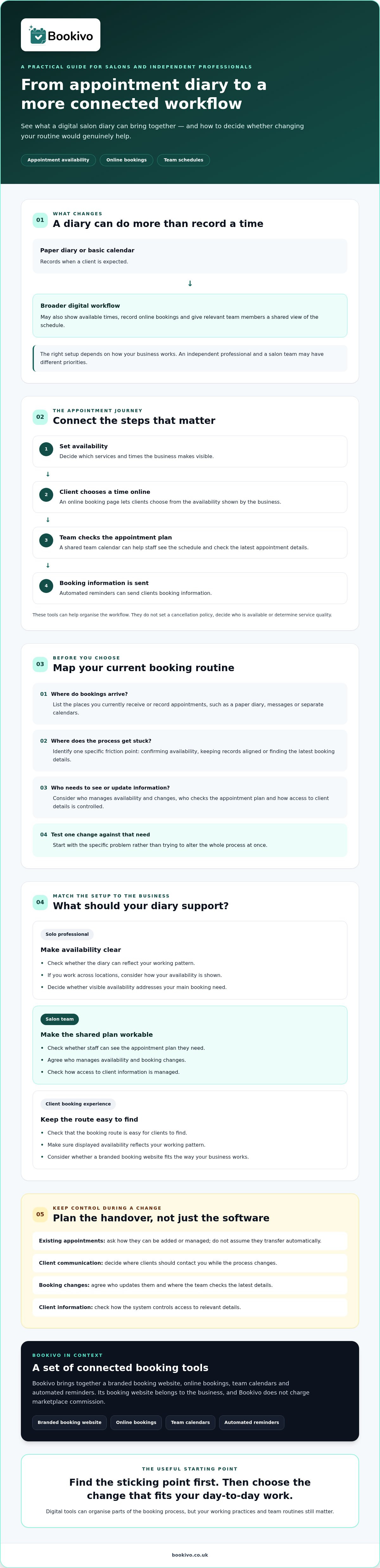
Hair and beauty salon diary software is a digital way to organise appointments and related booking activity. The change is not simply from handwriting to typing. A paper diary or basic calendar records when a client is expected. A broader digital workflow may also show available times, record online bookings and give the team a shared view of the schedule. The right tools depend on how your business operates: an independent hairdresser and a salon with a team may have different priorities.
When appointments are split between a paper book, client messages and separate staff calendars, someone has to keep those records aligned. A booking change might be updated in one place but missed in another, making it harder to confirm availability or check what has been agreed. Appointment scheduling software covers different forms of digital scheduling, from desktop to web-based and mobile tools. Rather than choosing by feature count, consider which approach fits your actual booking routine.
From paper appointment book to digital diary
A digital calendar can make the day’s appointments easier to scan, rearrange and share with relevant team members, depending on the system and its access settings. If you work at different locations, check that the diary can reflect your availability clearly. You can explore options for mobile beauty professionals as one example.
Paper can still suit a salon where one person manages bookings and the diary is easy for the team to consult. Digitising is a change in working habits, not a guarantee of better business results. Before switching, write down where booking details currently live, who needs to see them and what causes the most friction. For example, if the main issue is confirming availability, test whether a digital calendar makes that task clearer. Start with the specific need, then decide whether the change is worth the extra steps involved.
How salon diary software is moving beyond appointment scheduling
A diary that depends on staff entering every appointment is one way to manage bookings. With an online booking page, clients can choose from the availability a business has made visible. That moves part of the booking process to the client, while the salon decides which services and times to offer. If you add online booking to your website, check that the booking route is easy to find and that the displayed availability reflects your working pattern.
Once appointments are recorded digitally, features such as team calendars and automated reminders can support other parts of the process. A shared calendar can help staff check the appointment plan, while reminders can send clients booking information. These tools help organise workflow, but they don’t set your cancellation policy, decide who is available or determine the quality of a service.
Self-booking and connected daily workflows
Follow the process from a client choosing a time to the team preparing for the day. Can the right person see the appointment? If a booking changes, does the team know where to check the latest details? Is relevant client information easy to find? Clear working practices matter as much as the software. Agree who manages availability and booking changes, and check how the system controls access to client details.
For a solo professional, visible availability may be the main priority. A salon team may also need a shared view of appointments. Bookivo brings together a branded booking website, online bookings, team calendars and automated reminders. Its booking website belongs to the business, and Bookivo does not charge marketplace commission. If you’re considering how a branded booking page might fit your workflow, view a free branded preview.
How to assess salon diary changes without disrupting your routine
Modernising your diary doesn’t have to mean changing everything at once. Map how bookings arrive, where you record them, and who needs to check or update them. Then identify a specific sticking point: perhaps messages are easy to miss, availability is difficult to confirm or staff use separate calendars. Assess one change against that problem instead of trying to alter the whole process at once.
Before choosing hair and beauty salon diary software, list what your business needs. That could be flexible availability for one professional, team calendars, online booking or a combination. Think through how client communication and existing booking habits would work during a transition. For example, decide how you’ll handle appointments already in the diary and tell clients where to contact you while the process changes. Ask a provider how existing appointments can be added or managed, rather than assuming they will transfer automatically.
What should a solo professional or mobile therapist consider?
If you work across locations or vary your working pattern, check whether the diary can represent your availability clearly and help keep appointments organised. Think through how you’ll update the schedule when your location changes, and whether the system suits the way clients currently book. Mobile beauty booking options are one example to explore, not a recommendation that every solo professional needs the same setup.
What should a salon team consider?
For a team, ask who needs to see each person’s availability and how appointment changes are handed over. Try the proposed routine with the people who will use the diary, rather than assuming one calendar view will suit everyone. Use a typical working day to check whether staff can find the right appointment details and identify any steps that are unclear or need repeating.
If the system involves client information, consider who can access it and consult the Information Commissioner’s Office for relevant UK guidance. Software alone doesn’t determine how your business should manage that information.
What a more business-owned salon diary could look like next
A useful next step may be to connect appointment availability, client booking and the daily schedule, while keeping control of how your business presents its services and manages appointments. Hair and beauty salon diary software can support that approach, but the right setup is the one that fits your workflow, not necessarily the one with the longest feature list.
A branded booking website as one possible next step
One option is to let clients book through a website branded for your business, with appointments organised alongside the team calendar. Bookivo provides a branded booking website, online bookings and team calendars, with no marketplace commission on bookings. Its software is designed for beauty and salon businesses, including solo professionals. For self-employed professionals, its solo beautician booking solution is one example to review, rather than a template every business needs to follow.
A free branded preview is available before you decide whether to explore further. Use it to consider how a booking destination might fit into your current client journey and whether the change feels manageable.
Continue exploring at your own pace
Start with the booking or diary issue you identified earlier. Compare the proposed workflow with how clients currently make appointments and how your team organises its day. Check which tasks the software would bring together, and which would still need a separate process. You can then decide whether to take another step or keep your current routine.
Make your next diary change a considered one
A salon diary can do more than record appointments. Connected booking, visible availability and team organisation can bring parts of the daily workflow together, but the right setup depends on how your business operates. Map where bookings currently sit, identify one point of friction and assess any change against your clients’ habits and your team’s routine.
Bookivo combines a branded booking website with online bookings and team calendars. You can view a free branded preview before signing up, or explore its free 7-day trial with no credit-card requirement. Use either option to consider whether the approach suits your business and the way you currently manage appointments.
Make your next step a practical one: compare the preview or trial with the diary issue you want to solve, then decide whether it fits your workflow.
Frequently Asked Questions
What is hair and beauty salon diary software?
Hair and beauty salon diary software helps organise appointments and availability in a digital diary. Depending on the provider, it may also support online booking, appointment reminders or team calendars. Features vary, so check what a system actually includes before choosing it. Software can help manage booking activity, but it doesn’t replace your business’s booking policies or professional judgement.
Can salon diary software replace a paper appointment book?
Yes, a digital diary can replace a paper appointment book or sit alongside it, depending on your salon’s workflow. Before switching, decide how you’ll record existing appointments, manage changes and check staff availability. Map a typical booking from first enquiry to confirmed appointment. This helps you see where information needs to be updated and whether a digital process fits your routine.
What should a hair salon look for in diary software?
Start with appointment visibility and availability management, then consider whether you need online booking or team calendars. Before comparing providers, map how bookings arrive, where you record them and who needs to see or change them. A solo stylist may need a straightforward view of personal availability, whilst a salon team may need shared scheduling. A long feature list matters less than fit.
Is online diary software useful for a solo beauty professional?
It may help a solo professional organise availability and let clients book online, if those features suit their working style. Mobile practitioners should consider how they’ll manage availability changes across different working locations. Software can display the schedule you set, but it can’t decide when or where you should work. Explore mobile beauty booking options as one example.
Can salon diary software store consultation forms and client photos?
Some platforms include digital consultation forms and client photo storage, but these features vary by provider. Bookivo offers digital consultation and consent forms and before-and-after photo storage. A business remains responsible for its own consent processes, handling of records and professional decisions. Check what a provider’s tools do, how they fit your procedures and what guidance you may need for managing client information.
Ready to see whether a branded booking website could work for your business? Request your free branded preview or explore Bookivo’s free 7-day trial, with no credit-card requirement.