Salon Management System: Guide for UK Beauty Businesses
Learn how a salon management system links appointment diaries, client records and team schedules. A practical guide for UK beauty businesses and solo pros.
What if your appointment diary, client details and team availability all had a clearer place to work together? A salon management system can connect these everyday tasks, instead of leaving you to piece together information from separate calendars, messages and records.
If you’re spending time checking who’s available, updating client notes and keeping bookings in order, it can be difficult to see what a software feature list will actually change in your day. Online appointment booking is useful, but it’s only one part of running a salon. Broader management also involves how bookings relate to client information and staff schedules.
This guide explains the difference and helps you identify the workflows that matter to your salon, clinic, barbershop or solo business. You’ll see what to look for in a more connected booking process, from a business-owned booking website to team calendars and client records, so you can focus on a setup that fits the way you work.
Key Takeaways
- See how a salon management system can bring bookings, client records and team availability into a more connected workflow.
- Trace how an online booking can link with calendar management, reminders and relevant client information.
- Map your everyday tasks and bottlenecks before deciding which functions are essential and which are optional.
- Prepare services, appointment lengths and staff availability before introducing online booking in manageable stages.
What does a salon management system organise beyond the appointment diary?
A diary shows when appointments are booked. A salon management system can bring that schedule together with related tasks, such as handling online appointment requests, keeping client details organised and coordinating staff availability. The aim is to connect these jobs, rather than simply replace a paper diary with a digital calendar.
A booking calendar records appointments; salon management software connects appointments with the client and team information needed to organise day-to-day work. The available tools vary between platforms. A diary, client records, reminders and team calendars aren’t automatically included together in every system, so consider which tasks you need to manage in one place.
Which daily tasks can salon management software bring together?
Consider a client choosing an appointment online. The booking needs to match the right service and an available time. The salon may also need an organised place for client details and a way to send appointment reminders. For a team, staff availability matters too. Bookivo brings online bookings, client records, consultation and consent forms, automated reminders and team calendars into one platform. Focus on the connections that would be useful in your routine, as features differ across systems.
Does a solo beauty professional need a management system?
Solo professionals may not need to coordinate staff calendars, but they still manage appointment requests, working availability and client information. Online bookings and organised records can be useful even when one person delivers every service. A team salon has a different coordination need: bookings must fit each professional’s availability. If you work independently, explore booking software for solo beauty professionals as a starting point. Choose around the tasks you handle, not the size of a feature list.
How a salon management system connects bookings, clients and teams
A connected workflow starts when a client chooses a service and appointment time through the salon’s branded booking website. The booking appears in the relevant calendar, giving the owner or team a place to check the day’s schedule. If the platform supports reminders, these can also be sent ahead of the appointment. The value lies in seeing how each task relates, rather than managing the booking in one place and follow-up in another. For post-treatment follow-up, automated platforms such as Review Rank Ai can help streamline client feedback collection and response management.
From online booking to an organised client record
Appointment information can sit alongside client details, so staff have useful context when preparing for a visit. Depending on the platform, this may include client records and consultation or consent forms. Deposits and payments processed through Stripe are additional functions offered by some booking systems. Bookivo connects a branded booking website with online bookings, client records, consultation and consent forms, deposits, Stripe payments and automated reminders.
Connecting bookings with client and team information gives a salon a clearer view of the work surrounding each appointment.
Keeping team availability visible
For a salon with several bookable professionals, team calendars help staff and owners see who is available and when. For example, before confirming a requested time, the person managing the diary can check the relevant team member’s schedule. This supports coordination, but it doesn’t mean software automatically assigns the right staff member or optimises every appointment. Bookivo includes team calendars and availability management, giving businesses a shared place to view schedules.
Bookivo’s free branded booking preview offers a way to see how an online booking journey could appear for your business.
How to assess a salon management system against your real workflow
Feature lists can make different platforms look similar. A better test is whether the system fits the way your salon actually handles appointments, clients and staff. Before comparing options, write down the current process, including where information is recorded and where tasks tend to get delayed or confusing.
Start with the tasks that take time or cause confusion
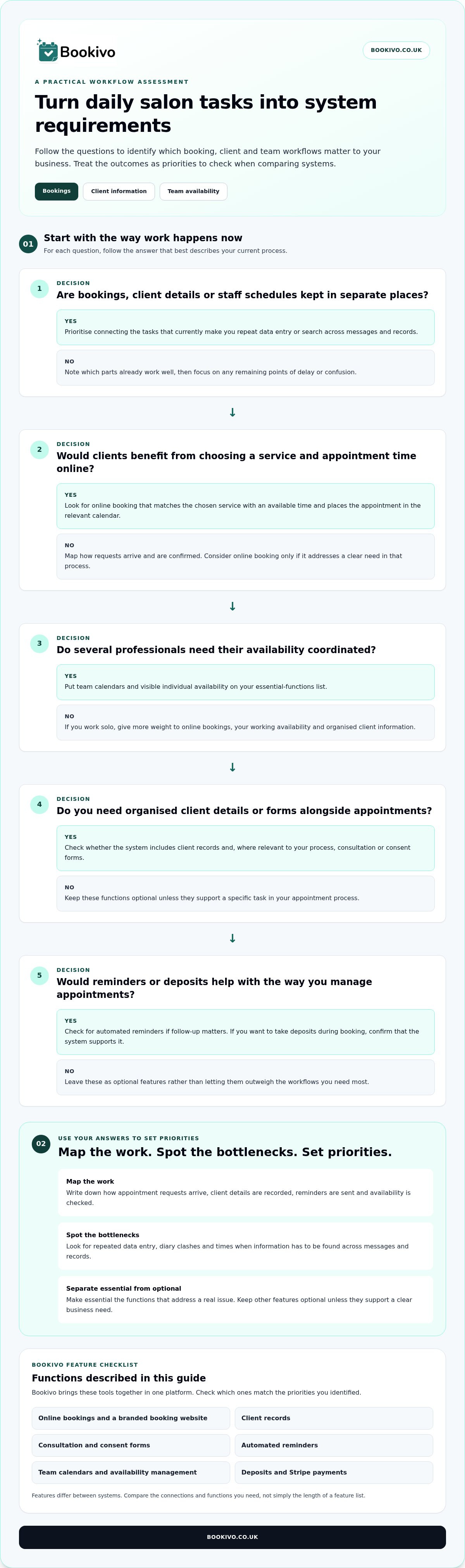
Use this short assessment to turn everyday frustrations into practical requirements:
- Map the work. Note how appointment requests are received, how client details are recorded, how reminders are sent and how availability is checked.
- Spot the bottlenecks. Look for repeated data entry, diary clashes or moments when someone has to search across messages and records to find information.
- Set priorities. Mark the functions that would address these issues as essential. Treat other features as optional unless they support a clear business need.
For example, deposits may matter if you want to take them during booking, while consultation forms or organised client information may be more relevant to your appointment process. A longer feature list isn’t automatically a better fit.
Match functions to the size and shape of your business
A solo professional may prioritise online bookings and a straightforward way to keep client information organised. A salon with several bookable team members may need calendars that make individual availability visible. Consider how you work now, and what tasks you expect to manage as your setup changes. For a closer look at booking software for solo beauty professionals, explore Bookivo’s options for independent practitioners.
The guide Salon Management Software UK: The Professional Guide to Modern Booking 2026 offers further context. Use your task map alongside it to judge whether a salon management system supports the workflows you actually need, not simply the most features.
How to introduce a salon management system without disrupting bookings
A steady transition starts with clear information, not a sudden change to the diary. Before setting up a salon management system, gather your current service names and descriptions, appointment lengths, working hours and each team member’s availability. This gives you a practical reference when organising the booking information and helps you spot gaps before clients use it.
Prepare services, availability and client-facing information
Review what clients need to know to choose and request an appointment. Check that service details are clear, appointment times reflect how you work, and staff availability is up to date. Then introduce online booking in manageable stages: prepare the details, review the booking journey, and let clients know where to book and what information to provide. Keep your existing process available while you check that the new arrangements reflect your diary. You can also review salon software pricing and plans as part of assessing what suits your business.
Preview the booking experience before taking the next step
Bookivo brings a branded booking website together with online bookings, team calendars, client records and consultation and consent forms. A preview gives you a way to see the branded booking experience before deciding how it could fit your day-to-day process. Bookivo also offers a 7-day free trial without a credit-card requirement. It includes unlimited bookings with one bookable calendar.
As you review the setup, check the booking journey from a client’s perspective and compare the calendar with your working arrangements. Tell clients clearly how to access the online booking page, while keeping your instructions consistent across the places you share booking information.
Choose a booking process that fits your salon
The right salon management system should support the way you work, not leave you sorting through a long list of features. Start with the daily tasks that need better organisation, then prioritise the connections that matter: appointments, client information and, if you have a team, staff availability. Preparing service details and working hours before introducing online bookings can also help make the change more manageable.
Bookivo brings a business-owned branded booking website together with online bookings, deposits, Stripe payments, client records and team calendars, with no marketplace commission on bookings. You can explore a free branded preview or try the platform for seven days without a credit-card requirement. Use these options to consider how the booking journey could fit your salon’s routine.
See what Bookivo could look like for your business.
A more connected process starts with practical steps. Choose the setup that gives you and your team a clearer way to manage the working day.
Frequently Asked Questions
What is a salon management system?
A salon management system is software that helps a beauty business organise appointments and related day-to-day tasks. Depending on the platform, this could include online bookings, team calendars, client records, reminders and payment options. A booking calendar may only show appointment times, while broader software can connect several parts of the workflow. Focus on functions that suit your salon’s services, schedules and way of working.
Is salon management software useful for a solo beauty professional?
Yes, it can help a solo professional manage online bookings, availability and client information without needing a team-based setup. The right choice depends on your services and working routine. Bookivo supports solo beauty professionals with a branded booking website and appointment-management features. Clients can book through the business’s own website, while the practitioner can organise appointments and client details in one platform.
What features should I look for in a salon management system?
Start with the tasks you need to organise, such as online bookings, staff availability, client records, reminders or deposits. Then consider whether the platform connects those functions in a way that fits your regular workflow. A solo practitioner may not need team calendars, while a salon with several professionals may value them. Prioritise functions you’ll use, rather than choosing by feature count alone.
Can a salon management system take deposits and online payments?
Some systems support deposits and online payments, while others focus mainly on appointment scheduling. Bookivo offers deposits and Stripe payments, including Apple Pay and other supported Stripe payment methods. Klarna is available only for eligible full payments where available, not for deposits. Check which payment options suit your booking process and how they fit alongside appointment scheduling. For businesses that also require bespoke in-person checkout hardware or integrated card terminals, consulting specialists such as PenguinPay can help identify the right setup.
How can I move from a paper diary to a salon management system?
Begin by recording your services, appointment lengths, working hours and staff availability. Use these details to organise the online booking setup, then explain to clients how to make an appointment through the new process. Introducing the change in manageable stages can help you keep the diary clear as clients adjust. Bookivo offers a free branded preview to show how your booking page could look.
Continue reading
- Switch from a Paper Diary to Salon Software: A Practical UK Guide
- Hair and beauty salon diary software: how digital diaries are changing in 2026
- Team Calendar Management for Salons: How to Organise Your Staff and Maximise Efficiency
- Salon Management Software UK: The Professional Guide to Modern Booking 2026