UK Salon Booking Software Alternatives: What to Compare Before Switching
Weighing up Fresha alternatives UK? Compare salon booking systems, deposit options, client records, and team calendars before you switch to a new setup.

Switching booking software won’t automatically make a salon’s working day easier. If you’re weighing up salon booking software alternatives in the UK, start with the tasks that cause friction now, not a generic list of features. A solo beauty professional may need a different setup from a salon coordinating appointments across a team, and a lower headline cost may not tell the whole story.
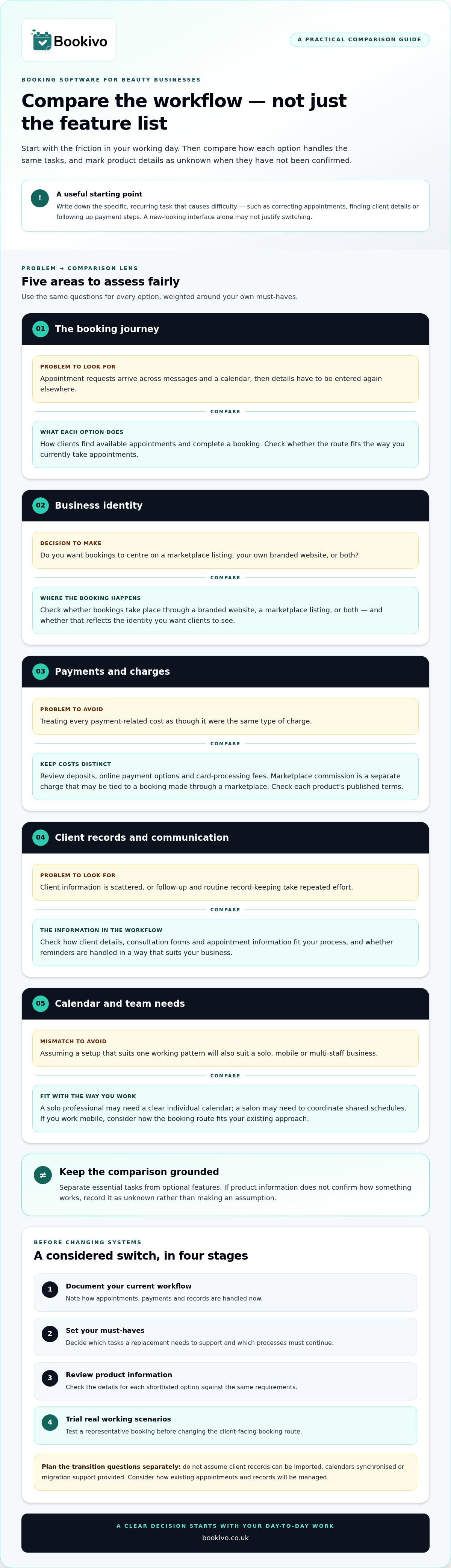
Before making a move, compare how each tool handles online bookings, payments and deposits, client records, reminders and day-to-day team bookings. Consider who owns the booking journey too: do you want marketplace discovery, or a branded website that supports direct bookings? This guide offers a practical checklist to help you weigh those workflows fairly, spot what a switch could improve and decide whether changing systems suits your business. It also explains where Bookivo, a UK booking and business management platform, may fit, with a branded preview and free trial to help you assess it before committing.
Key Takeaways
- Pinpoint the part of your current booking process that creates difficulty before deciding whether a new interface alone justifies switching.
- Use a consistent checklist to compare fresha alternatives uk, including booking flow, business ownership, payments, client records and team needs.
- Plan a switch by documenting your workflows, setting must-haves, reviewing product information and trialling a shortlist before committing.
- Assess whether Bookivo’s branded booking website and tools for deposits, forms, reminders, client records and team calendars suit the way you work.
When should a UK beauty business consider booking software alternatives?
Start with a practical question: what is difficult in your current booking process? A newer-looking interface can be appealing, but it isn’t by itself a reason to switch. Look for recurring friction that affects the work: time spent correcting appointments, client details scattered across separate records, or payment steps that need repeated follow-up.
Set a clear threshold. Consider changing systems when a specific, frequent problem affects bookings, client communication, payments or administration, and a realistic alternative appears able to address it without disrupting essential tasks. If your current setup works reliably and the only drawback is its appearance, switching may not be worth the time involved.
Which signs suggest your current booking process no longer fits?
For a solo professional, the pressure point might be handling appointment requests across messages and a calendar, then re-entering details elsewhere. In a salon or clinic with several team members, it could be harder to see who is booked, keep client records organised or coordinate shared schedules. These are different workflows, so assess your own working day rather than assuming a tool that suits one setup will suit another.
Track where work gets repeated or information becomes fragmented. Note whether the issue affects the client’s route to booking, your follow-up, payment handling or routine record-keeping. A list of concrete examples is more useful than a general feeling that the system is frustrating.
What should you decide before comparing alternatives?
Separate must-haves from nice-to-haves. Write down which tasks a replacement needs to support, which current processes must continue, and what would make the change worthwhile. Priorities might include a branded booking website, deposits, or a shared team calendar. Broader Fresha alternatives for UK salons are easier to assess against these criteria than by interface alone.
- Essential: tasks that currently affect bookings, payments or records.
- Optional: features that could be useful but won’t resolve the main problem.
- Must continue: processes your staff and clients rely on during a transition.
Use the same priorities as you explore fresha alternatives uk. A wider view of your day-to-day operations, including staffing and client management, can also help you judge whether a booking tool fits the business as a whole.
How to compare booking software for beauty businesses fairly
Compare the same workflows across each option, then mark a feature as unknown if the product information doesn’t establish how it works. That keeps assumptions out of the decision and makes fresha alternatives uk easier to assess against your actual priorities.
| Area | What to compare |
|---|---|
| Booking flow | How clients find available appointments and complete a booking. |
| Business identity | Whether bookings happen through your branded website, a marketplace listing, or both. |
| Payments | Deposits, online payment options and card-processing fees. |
| Client records | Whether client details, consultation forms and appointment information fit your process. |
| Team needs | Whether documented calendar features suit solo, mobile or multi-staff work. |
Keep payment costs distinct. Card-processing fees apply to processing a payment; marketplace commission is a separate charge that may be tied to a booking made through a marketplace. Compare the published terms for each product rather than treating these costs as interchangeable. For broader industry context, Grand View Research’s spa and salon software market analysis is useful background, but it won’t confirm a particular tool’s features.
Does the booking system support your business model?
A solo practitioner may prioritise a clear individual calendar, whilst a salon needs to understand how appointments are organised across staff. If you work mobile, consider how the booking route fits your existing way of taking appointments. Check whether the client journey reflects your business identity or centres on a marketplace listing. Bookivo offers a branded booking website; view a branded preview for your business to consider how that approach could look.
Are payments, records and communication handled in one workflow?
Check for deposits, online payments, consultation and consent forms, client records and automated reminders. Bookivo includes Stripe payments and Apple Pay as payment options, though the suitable method depends on the payment. Compare the workflow and current plan details on the Bookivo pricing page. The right comparison is the one weighted around your must-have tasks, not the longest feature list.
How to plan a booking-system switch without disrupting your business
A careful switch starts before you move any client-facing booking link. Work through a short sequence: document how appointments, payments and records are handled now; shortlist the tasks a replacement must support; review product information; then trial the option against real working scenarios. This makes it easier to spot gaps before they affect clients or staff.
Keep your current booking route and processes available while you assess a new setup. Don’t assume that client records can be imported, calendars synchronised or migration support provided. Treat each as a separate transition question, and plan how you’ll manage existing appointments and records if the process differs from your current one.
What should you test during a trial?
Run through a representative booking from the client’s perspective, including a deposit if that’s part of your process. Then check the appointment details, reminder and staff calendar from the business side. Review the booking experience on both mobile and desktop, and note any step that feels unclear or requires extra manual work.
Bookivo offers a 7-day free trial without requiring a credit card. Use that time to test against your checklist, not just to browse the settings.
How can you assess the change before signing up?
Write down what needs to happen to existing appointments, client records and the public booking link. Compare the answers you can establish from product information with your documented workflow. If you use a business-owned booking website, consider how the new route will represent your identity; Bookivo provides a branded booking website for direct online bookings.
Only change the public route once you’ve assessed the new booking journey and know how you’ll handle the transition. A trial is a chance to find practical gaps, not a reason to rush.
How Bookivo fits a business-owned booking workflow
Bookivo is one option to assess if your comparison points towards a business-owned booking journey rather than relying on a marketplace listing. It combines online bookings with a branded booking website, so clients can book through a route that reflects your salon or beauty business. Bookivo doesn’t charge marketplace commission on bookings. That’s distinct from card-processing fees, which are a separate cost to consider when comparing payment arrangements.
Which Bookivo features may match your checklist?
If business identity and direct bookings matter to you, the branded website is a key part of the workflow to explore. For client records, Bookivo includes consultation and consent forms, a client CRM and before-and-after photos. These tools can bring relevant information into your business workflow, but they don’t replace your responsibility for how client information is managed.
For appointments involving several staff, team calendars can help you consider how schedules fit into the booking process. Deposits and Stripe payments support payment workflows, whilst automated reminders and forms cover other steps to assess. The useful question is how these confirmed tools match your checklist, not whether a longer feature list sounds impressive.
What is a low-commitment next step?
Before signing up, you can view a free branded preview or mock-up to see how a business-owned booking website could represent your salon. It gives you something concrete to compare with the client-facing booking journey you want.
To try the workflow directly, Bookivo offers a 7-day free trial without requiring a credit card. Use it to assess bookings, payments, forms and team calendars against your must-haves. That’s a practical way to judge whether Bookivo fits, without treating any one platform as the right choice for every business.
Make your next booking-system decision with confidence
Let one unresolved issue guide your next step. Your shortlist of fresha alternatives uk should be judged by whether it can address that issue in the way your business actually works, not by how many features appear on a page. A useful next move is to turn your decision threshold into a simple test: what would need to feel clearer or easier for you to consider changing?
Before committing, picture the booking journey from a client’s first visit through to the appointment being recorded. Does the proposed setup feel right for your business and the way you want clients to book? A preview can help you assess that impression without relying on a feature list alone.
See what Bookivo could look like for your business.
Take the time to choose a system that supports your priorities. A considered decision can give you a clearer starting point for your next stage of business.
Frequently Asked Questions
Can I use booking software without listing my beauty business on a marketplace?
Yes. Booking software doesn’t necessarily require a public marketplace listing. Before choosing this model, map how a new client will find your booking page and how a returning client will get back to it. For example, make the route easy to locate from your business website and the channels you already use. Also consider whether accepting bookings through more than one route could create duplicate admin.
What should I check before switching salon booking software?
Plan the changeover around the appointments already in your diary. Identify upcoming bookings, deposits already taken and client messages that staff may need to handle during the transition. Agree who will manage changes and how clients will be told about the new booking route. These practical details help the team prepare for the switch without relying on assumptions about how information will carry across.
Can booking software take deposits and online payments?
Yes, some booking systems support both, but payment conditions can differ. Check which methods are available for deposits and full payments, and when processing charges apply. Bookivo supports deposits and Stripe payments. Klarna is available only on eligible full payments where available, not on deposits. Review the applicable payment terms before explaining options to clients.
Is a free trial enough to decide whether booking software suits my salon?
A trial can help you assess the workflows you use, but it only shows what you test. Include an unusual but familiar situation, such as a client needing to change an appointment, and note whether the steps are clear. If colleagues use the diary too, ask them to try their own tasks. Their feedback can reveal practical differences between individual and team use.
Do I need a branded booking website as well as a salon website?
No. Your main website can provide fuller information about your business, whilst a booking page can focus on helping clients arrange an appointment. The important detail is a clear hand-off between the two. Check that the booking route is easy to find and that the business name and key details remain consistent, so clients can move from learning about your salon to booking with confidence.