Aesthetic clinic software for booking and practice management
Find the best booking app for aesthetics clinics. Learn how combined appointment scheduling, secure deposits, and client records streamline your daily admin.

A booking calendar is only one part of running an aesthetics clinic. Aesthetic clinic software combines online appointment booking with tools for managing day-to-day tasks. The best booking app for aesthetics should connect booking links with deposits and online payments, giving clients a clear way to reserve and pay for appointments.
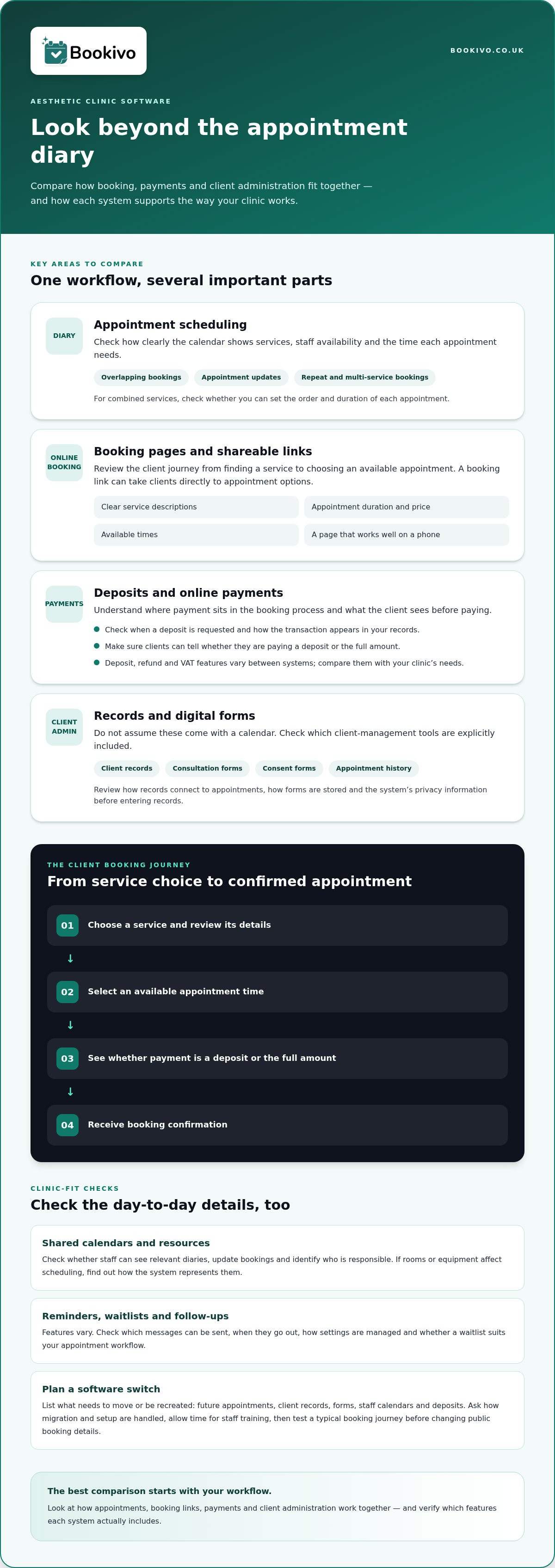
It pays to look beyond the diary. When bookings, payments and client administration are handled in separate places, keeping the day organised can be harder. Software that brings these tasks together can simplify the workflow while letting you set up services and booking steps to suit your clinic.
This guide explains what aesthetic clinic software can include and how booking tools, shareable links, deposits and online payments support clinic management. It also covers what to compare, how digital forms and client records fit in, and how to choose a system that suits your clinic.
Key Takeaways
- Look beyond the appointment diary: useful clinic software can bring booking and everyday practice management into one system.
- Compare how each option handles appointment scheduling and the admin that surrounds it, including forms and client records.
- Consider how a booking website or shareable link fits into your existing client journey, from finding an appointment to reserving it.
- Understand how deposits and online payments work in the booking process before choosing a system for your clinic.
What is aesthetic clinic software?
Aesthetic clinic software combines appointment scheduling with tools for organising clinic operations. A booking system can display services and available appointment times, while management features help bring related tasks into one workflow.
Appointment scheduling and management
A scheduling calendar helps a clinic organise appointments around services, staff availability and the time each booking requires. Listing appointment types separately, for example, helps clients select the right slot. Compare how clearly the diary is displayed, how overlapping bookings are handled and how easily staff can update appointments. These details affect how reliably the team can manage the day.
Recurring and multi-service bookings
Recurring bookings let clients arrange repeat appointments without starting from scratch each time. Multi-service bookings can combine separate services in one visit, such as a consultation followed by another bookable appointment. Check whether the system lets the clinic set the order and duration of each service. Clear booking details help staff prepare and clients understand what they have reserved.
Online changes and cancellations
Online booking lets clients choose an available appointment without arranging it by phone or email. The system should make the steps for changing or cancelling a booking clear, including any clinic policies shown to clients. Clients might, for example, use a booking link to select another available slot. Check how changes appear in the calendar so staff can see the updated appointment.
Reminders, waitlists and follow-ups
Do aesthetic booking apps support reminders, waitlists and automated follow-ups? Some include automated appointment reminders and follow-up messages, while waitlist features vary. Check which messages can be sent, when they go out and whether staff can manage the settings. A follow-up might direct a client to the clinic’s aftercare information, while a waitlist can help organise interest in a newly available appointment.
Aesthetic clinic booking and practice management software
Aesthetic clinic booking tools may sit alongside calendars, client records and operational features. The right combination depends on how practitioners organise appointments, information and clinic tasks.
UK-specific software considerations
Choose software around the services and workflows your clinic actually uses. If you manage prescription products, for example, useful stock records can include batch numbers, expiry dates and stock levels. Audit trails can also help document changes. Check how the system stores client data, treatment notes, consent forms and before-and-after photos, and review its privacy information before entering records.
Clinic calendars and staff scheduling
A shared clinic calendar helps practitioners see appointments alongside their availability. Check whether staff can view the relevant diary, update bookings and identify who is responsible for each appointment. If rooms or equipment affect scheduling, find out how the system represents those resources. A clear calendar reduces the need to compare separate diaries when arranging consultations and other services.
Client records and treatment forms
Which platforms offer client records, consultation forms and treatment consent forms? Look for booking software that explicitly includes client management, digital consultation forms and consent forms, rather than assuming they come with a calendar. Check how records connect to a client’s appointment history and how forms are stored. Some systems also offer AI assistants for calls or clinical notes; review their output and how practitioners can check it.
Planning a software switch
Before switching, list the information and workflows your clinic needs to carry across. Include future appointments, client records, consent forms, staff calendars, deposits and any stock fields you rely on. Then map how each item will be transferred or recreated, and schedule time for staff training. Ask how data migration and setup are handled, and test a typical booking journey before changing your public booking details. A branded booking website preview can help you consider how an online booking journey may appear to clients.
Online booking site and booking links
A clinic’s online booking page brings together its services, availability and payment steps. Review the client journey from selecting a treatment to receiving confirmation.
Booking sites and branded pages
A branded page can bring a clinic’s name, treatments and booking options together. Check how it looks on a phone, where clients may first see it. Share a booking link through social media, messages or marketing materials to take clients directly to available appointments.
Review the details clients see before selecting a slot: service descriptions, appointment duration, price and available times. If you use before-and-after photos, decide how they fit your page and obtain appropriate consent before using them. A branded booking website preview can help you picture how your booking page may appear.
Online scheduling and deposits
Online scheduling should display current availability so clients can choose a suitable appointment. Check how new bookings appear in the clinic calendar and whether clients have clear steps to change or cancel. This connects the public booking page with the diary staff use to manage appointments.
Deposits add a payment step to the online booking process. Review when a deposit is requested, what clients see before paying and how the transaction appears in your records. Clients should be able to tell whether they’re paying a deposit or the full amount before completing a booking.
Can UK aesthetics booking apps support deposits, refunds and VAT? Some systems support deposits and online payments, but refund controls and VAT tools vary. Check the payment and record-keeping features against your clinic’s needs, and seek appropriate tax guidance on VAT treatment.
Integrated payments and deposits
Integrated payments connect a client’s booking choice with payment. For an aesthetics clinic, this can mean requesting a deposit during online booking instead of arranging payment separately. The process should make clear what clients are paying, when payment is due and how the clinic handles changes.
Review the payment flow from the client’s profile. Does the booking record show whether a deposit was paid, or must staff check another system? Clear records help the team understand each appointment’s payment status. Check how refunds and cancellations are described, and make sure the details match the clinic’s booking policy.
Reminders can support the process by repeating appointment details clients may need. Check whether messages include payment information and whether the clinic can control their wording. Keep any consent request separate and clear. For example, agreeing to receive appointment reminders is different from consenting to use photos for marketing.
Consider the full route clients take to book. A link on the clinic website or Google Business Profile can take them directly to available appointments and payment. Review the page on a phone, then test a sample booking from service selection to confirmation. Look for unclear wording, unexpected steps or payment instructions that appear too late.
A seamless setup is about more than accepting payments online. It connects bookings, deposit information and appointment records in a way staff can follow. Before choosing a system, map a typical client journey and note where the team currently switches between tools. Prioritise a payment process that shows costs and policies before clients complete a booking.
Bookivo: Beauty & Salon Booking Software
Bookivo provides aesthetics clinics with online appointment booking and a branded booking website. It brings appointment management, deposits and online payments together, giving clients a clear route from selecting a service to completing a booking.
Consider it if you want clients to book through a page that reflects your business, rather than managing appointments through separate manual steps. Bookivo’s online appointment booking system supports appointment booking, deposits and payments online. It’s designed for booking and business management, not as medical practice management software.
See what Bookivo could look like for your business.
Choose a booking workflow that fits your clinic
The best booking app for aesthetics is the one that fits your clinic’s workflow, not necessarily the one with the longest feature list. Before deciding, map a typical client journey and note where your current process feels fragmented. Use this practical checklist to assess whether a booking platform can support the way you manage appointments and present your clinic online.
Bookivo offers beauty and salon booking software, aesthetics clinic booking software and an online appointment booking system. If you want a more organised booking experience, explore how its branded booking website could suit your clinic.
Take the next step at a pace that works for you. A clear booking process can make clinic management easier to navigate.
Frequently Asked Questions
Can I take deposits for appointments to reduce no-shows?
Yes, some online booking systems let you request a deposit when a client books. This makes the payment commitment clear, but does not guarantee attendance. Set out your deposit and cancellation terms before clients confirm, and make sure staff can see payment status alongside the appointment. Bookivo supports online deposits, while your clinic remains responsible for setting and communicating its booking policies.
Do these booking systems integrate with my website?
Some systems connect to an existing website through a booking widget, while others provide a separate branded booking website. Bookivo offers both. For example, a clinic could place the widget on a treatments page, taking clients from service information to available appointments. Check how the booking experience appears on mobile before choosing your setup.
What are the best booking apps for aesthetics clinics in the UK?
The best booking app for aesthetics clinics depends on your daily workflow, not a universal ranking. Compare appointment booking, deposits, consultation forms, client records and team calendars against the tasks your clinic handles. Bookivo is a UK booking and business management platform for aesthetics clinics, with a branded booking website and online appointment booking. Consider whether these features fit your needs before deciding.
Which aesthetic booking apps support online appointments, deposits and cancellation fees?
Look for a system that supports online appointments and deposits, then check its cancellation-fee options separately. These are different functions: deposits do not automatically mean the system can charge cancellation fees. Bookivo supports online appointment booking and deposits. Review the payment settings and client-facing terms to understand how cancellations are handled, and choose a process your clinic can explain clearly.
Which booking apps integrate with payment processors, calendars and accounting software?
Integration options differ, so check the current feature information for the specific payment, calendar and accounting tools you use. Bookivo processes online payments through Stripe and includes team calendar management. This does not mean it connects to every external calendar or accounting system. If a particular integration is important to your workflow, check the software documentation for that exact connection before relying on it.
How do UK aesthetics booking apps handle GDPR and sensitive client data?
Data handling varies by platform. Before storing client details, consultation forms or photos, review the provider’s privacy information, access controls, retention options and data-processing terms. Consider who in your clinic can view records and how access is managed when staff roles change. Booking software does not automatically make a clinic compliant. For UK data protection guidance, consult the Information Commissioner’s Office (ICO).