Beauty Salon Booking Software UK: A Practical Guide to Choosing a System
Looking for the best beauty salon booking software UK? Compare systems based on your client journey, team schedules, and deposits with our practical guide.

The best booking system isn’t the one with the longest feature list; it’s the one that fits how your beauty business works. If appointments are split between a paper diary, messages and staff calendars, it can be hard to see what needs organising next. A useful way to assess beauty salon booking software uk options is to start with your client journey and daily workflow, not a list of features.
You may need a simple way to manage your own appointments, or a shared view of availability across a salon team. Deposits, reminders and online bookings can also shape which tools are useful for your business. This guide offers a practical framework for comparing systems, from mapping how clients book to identifying the functions that match your setup. You’ll also get a clearer sense of which features to prioritise and how to take an uncomplicated next step towards a more organised booking process.
Key Takeaways
- Map how clients discover, book and follow up before comparing software features.
- Compare a business-owned booking website with a marketplace listing to understand how clients will book with you.
- Choose tools for client records, forms and team calendars that match your services and working setup.
- Use a simple shortlist to assess beauty salon booking software uk, then try the booking journey before deciding.
Start with your beauty business's booking workflow, not a feature list
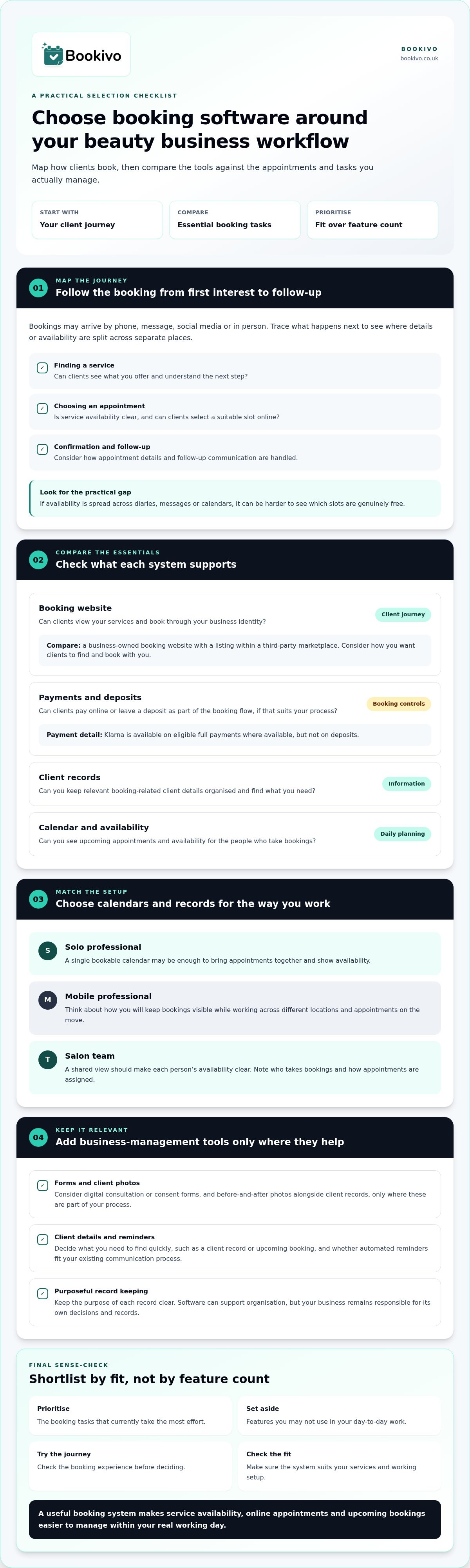
Bookings can arrive by phone, message, social media and in person. When availability is also noted in separate diaries or calendars, it takes extra effort to see which slots are genuinely free. Before comparing beauty salon booking software uk options, trace what happens from a client’s first interest to their appointment follow-up. That will show where a system needs to fit your actual working day.
Beauty salon booking software organises online appointment selection, service availability and upcoming bookings in a digital diary. This is the core role of appointment scheduling software, but your booking journey may also involve tasks beyond the diary.
What should a booking system organise?
Map the client journey: finding a service, choosing an available appointment, receiving confirmation and getting any follow-up communication. The essentials are clear service availability, a way to book appointments online and an up-to-date view of what’s coming up. Then separate these from optional business-management functions, such as client records or forms. Prioritise the booking tasks that currently take the most effort; don’t choose a system based on features you may not use.
How does a solo business differ from a salon team?
For an independent professional, one bookable calendar may be enough to show availability and keep appointments together. A mobile therapist may also need to consider how they manage availability while working across different locations. Bookivo’s mobile beauty booking tools are relevant to that kind of workflow.
In a salon with several professionals, a shared view needs to make each person’s availability clear. Team calendars help organise bookings across staff schedules, reducing reliance on separate diaries or messages to establish who is free. Write down who takes bookings and how appointments are assigned before deciding which calendar setup suits your team.
Compare beauty booking software by the client journey it supports
Compare each system against what clients need to do and what you need to manage. A booking website can let clients view services and select appointments under your business identity. A marketplace listing, by contrast, places your business within a third-party platform. Bookivo provides a branded booking website owned by the business, with no marketplace commission on bookings. Neither approach guarantees more bookings; consider which route suits how you want clients to find and book with you.
Use this quick comparison to focus on fit, not feature count:
| Area | What to assess |
|---|---|
| Booking website | Can clients view your services and book through your business identity? |
| Payments | Can you take online payments or deposits as part of the booking flow? |
| Client records | Can you keep relevant booking-related client details organised? |
| Calendar | Can you see availability and appointments for the people who take bookings? |
Does a branded booking website suit your business?
If you already have a salon website, think about how clients move from reading about a service to choosing a slot. A booking option that sits naturally within your business’s online presence can make that journey clearer. If you’re comparing systems, Zapier’s review of appointment scheduling apps offers a broader look at scheduling tools and their uses.
Which payment and booking controls do you need?
Deposits and Stripe payments can form part of an online booking flow. Consider which services require a deposit and how you want clients to complete payment. Klarna is available on eligible full payments where available, but not on deposits. Prioritise controls that suit your process rather than assuming a payment option will change booking outcomes.
Want to see how a business-owned booking website could present your services? View a branded preview for your business.
Check whether client records, forms and team calendars fit your work
Booking tools can also bring appointment-related details together. Before choosing beauty salon booking software uk, note what you currently need to find before, during or after an appointment, and where that information is kept. The aim is to support your workflow, not collect information simply because a system has a field for it.
When are digital forms and client photos useful?
Digital consultation and consent forms may suit businesses that want these documents connected with their client workflow rather than handled separately. Before-and-after photos can help organise images alongside client records where they’re part of your process. For an aesthetics clinic, consider whether forms and photos are relevant to the way appointments are managed, and what information staff need to access. Keep the purpose of each record clear.
Will the calendar work for a solo, mobile or team business?
A solo professional may need a straightforward view of their own appointments and availability. For mobile work, consider how you’ll keep bookings visible around appointments delivered on the move; Bookivo’s mobile beauty booking tools are designed for this business context. In a team, shared calendars and availability management can help staff see who is booked and when each person can take appointments.
Customer CRM tools can help keep booking-related client information together, while automated reminders support communication around appointments. Think through what you need to find quickly, such as a client record or upcoming booking, and whether reminders fit your existing process. Software can support the organisation of records, but your business remains responsible for its own decisions and records.
Client information needs careful handling. For general UK data protection guidance, consult the Information Commissioner’s Office guidance. A booking platform can provide tools for managing information, but using software does not by itself make a business compliant.
Choose a booking system you can adopt with confidence
A practical way to assess beauty salon booking software uk is to move from your needs to a hands-on review. Keep the process focused on the tasks you identified, rather than trying to judge every feature at once.
- List your booking needs. Note where appointments are currently handled and what causes the most friction.
- Identify essential functions. Separate must-haves, such as online bookings or team calendars, from features you may not need.
- Test the client journey. Check how a client views services, selects an appointment and moves through booking.
- Review the fit. Consider whether the system’s booking and management tools suit your business’s day-to-day work.
What should you test before moving your bookings?
Walk through the booking experience as a client. Are services and available appointments clear? Then consider your own routine: how will you use the calendar, reminders, forms and payment options? For example, a solo professional may focus on managing one schedule, whilst a salon team may need calendars that make staff availability easy to view. Note any steps that feel unclear or add extra work.
How can you preview a branded booking website?
A free branded preview or mock-up gives you a way to see how a booking website could look for your business before deciding whether it suits your presentation. Bookivo also offers a seven-day free trial without requiring a credit card, so you can explore the system’s fit with your workflow. Review the pricing information for details of its fixed monthly pricing.
Make your next step a practical one
The right choice is the system that makes your daily routine clearer, not the one with the most options. Use your shortlist to judge whether beauty salon booking software uk can support the way you want clients to book and the way you organise appointments. A focused trial of the client journey can help you spot what feels straightforward and what needs a closer look before you change your process.
You can explore the fit at your own pace. Start with the booking experience, then consider how it would sit within your business as it grows or changes. A well-chosen system should feel useful in practice, not just impressive on a feature page.
Take the next step when you’re ready, with a clearer view of what could work for your business.
Frequently Asked Questions
Can beauty salon booking software take deposits online?
Yes. Booking software can support taking deposits online as part of arranging an appointment. Before choosing how to use this option, decide which appointment types it should apply to and make the relevant terms clear before a client confirms. This helps clients understand what they’re paying at the booking stage and gives you a consistent process to follow when managing appointments.
Can a solo beauty professional use salon booking software?
Yes. Booking software can suit an independent beauty professional, not just a salon with several staff. It can give clients a way to arrange appointments and help you keep your booking routine in one place. Choose a setup around the services you offer and the way you work, rather than paying attention only to functions designed for managing a larger team.
Does booking software replace a beauty salon website?
Not necessarily. You can keep your existing website for introducing your business and explaining your services, then use booking software to handle appointment selection. The key is making the route from service information to booking clear. If your current site already supports that journey, the software may complement it; if not, consider how clients will move between the two.
Does Bookivo charge commission on bookings?
No. Bookivo doesn’t charge marketplace commission on bookings. Bear in mind that commission and payment processing are separate costs: card payments processed through Stripe are subject to standard card-processing fees. Factor those fees into your own payment planning, and distinguish them from any software subscription cost when assessing the overall fit for your business.
Can I try Bookivo before choosing a booking system?
Yes. You can try Bookivo before deciding whether it suits your business. Use that opportunity to make a test booking journey, check how your services appear to clients and consider how the system fits your day-to-day routine. Pay particular attention to any steps you or a client would need to repeat, clarify or handle outside the booking process.