Choose affordable beauty salon software with support for switching
Find affordable beauty salon software that fits your budget. Learn how to compare booking tools, core features, and migration support when switching systems.
Switching salon software is easier when you plan around the information and routines your business relies on. Affordable beauty salon software should be judged on more than price: consider online booking, essential features, support and how you’ll move your setup. A clear plan helps you change systems without losing sight of your salon’s day-to-day needs.
Worrying that a change could disrupt bookings or add admin is understandable. Compare what each system actually does, then find out how its setup and migration support can help you make the transition.
This guide covers online booking, core features, support and switching, with practical points for salons, clinics and independent professionals. Use it to identify what your business needs and what to prepare before changing systems.
Key Takeaways
- Compare booking tools by how easily clients can view availability and make appointments outside your opening hours.
- Plan a software switch around the records, booking details and routines your salon needs to carry across.
- Assess customer support by how clearly it explains setup and migration steps, not just how quickly you can get started.
- Prioritise core features that fit your day-to-day work, then use the decision guide to weigh what matters most to your business.
Online appointment booking
UK salon platforms differ in how clients book, how appointments appear in the diary and how they charge. Online booking and reminders are common, but check plan details and scheduling controls before choosing.
Online self-booking and scheduling
Self-booking lets clients select a service and available appointment time online, rather than arranging each booking by phone or message. Look for a clear journey from treatment choice to confirmation, with availability that reflects your working diary. For mobile beauty professionals, booking for mobile beauty needs to fit appointments across different locations, not just a fixed salon room.
Booking prices and commissions
Compare subscription charges with any commission linked to bookings, and identify what triggers additional costs. A subscription gives you a clear ongoing charge, while commission may make costs depend on booking activity. Read pricing terms alongside payment and deposit arrangements. Compare the full cost structure, not just the headline price, and consider how it fits your booking volume.
Diary and calendar flexibility
Your salon diary should match the way you work. A solo therapist may need a personal calendar, while a team salon needs appointments organised around staff and treatment availability. Check how easily you can set working hours, appointment lengths and breaks. Flexible scheduling helps prevent online availability from clashing with time set aside for preparation, cleaning or other business tasks.
Appointment reminders
Reminders support the booking process by prompting clients about upcoming appointments. Salon software can use automated appointment reminders to help reduce missed bookings, though reminders don’t remove every reason an appointment might be missed. Compare whether reminders are included in the subscription and how their timing and delivery are described. Make sure the reminder process suits your salon’s communication style.
| Booking option | Cost structure | Diary fit | Reminder support |
|---|---|---|---|
| Online self-booking | Subscription or commission | Client-led scheduling | Check plan details |
| Manual booking | Software plan, if used | Staff-managed calendar | May need manual follow-up |
Choose software that fits your booking routine, cost structure and diary needs.
Can salons switch salon software easily?
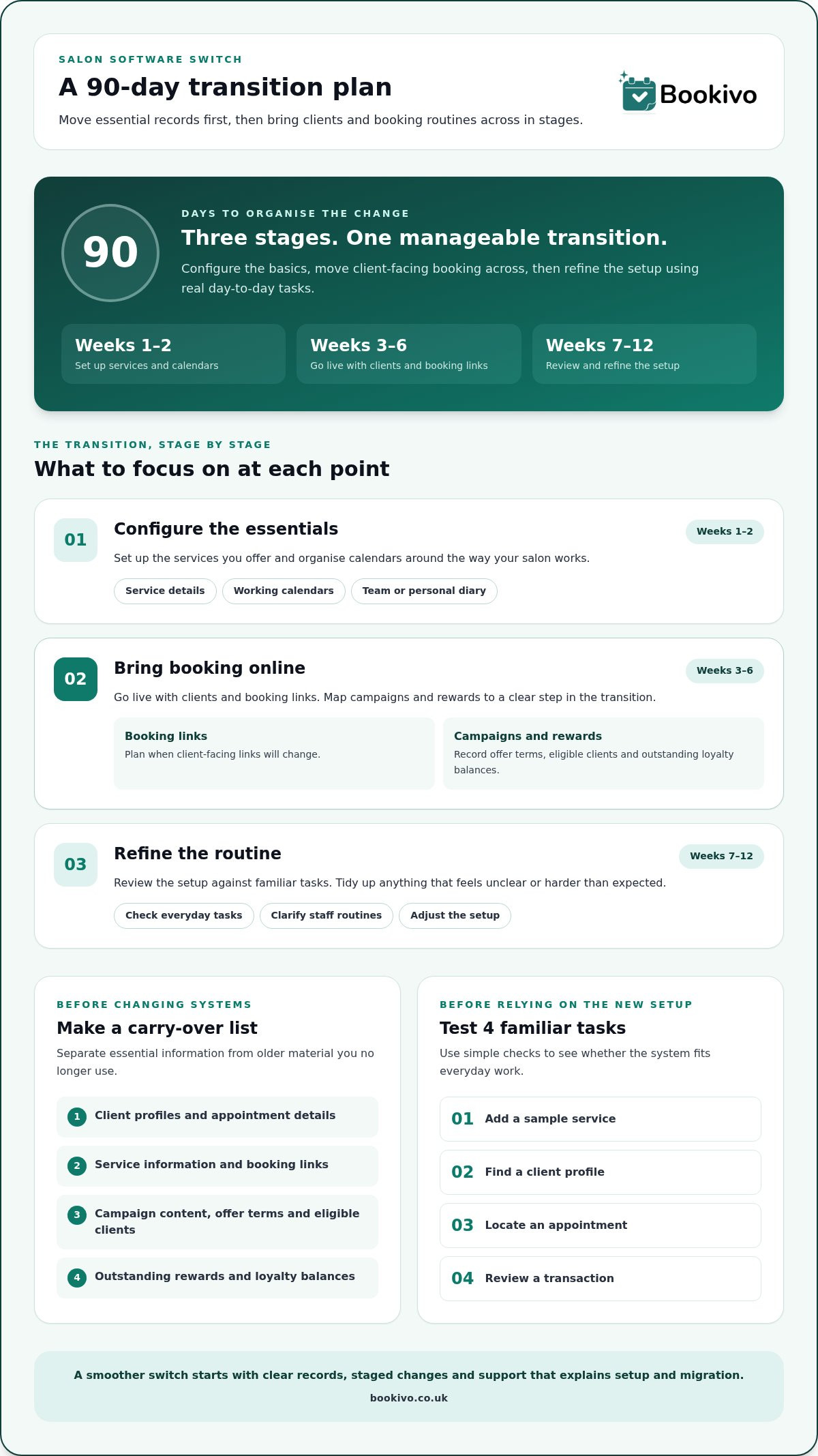
Make switching more manageable by planning which records and routines to move first. Start with client and appointment information, then list active campaigns, loyalty balances and booking links. For example, if you run a repeat-visit offer, decide how you’ll honour existing rewards after changing systems. A staged transition is easier to manage than changing every client-facing detail at once.
Plan carefully for marketing campaigns and loyalty schemes. Record the offer terms, eligible clients and outstanding rewards, then decide how to continue each one after the change. Find out whether campaign content and client lists can be transferred or need rebuilding. Keep a clear record of loyalty balances so staff can explain the arrangement consistently.
No single UK salon platform has the lowest payment processing fees for every business. Costs depend on the payment method and fee structure, so compare processing charges with subscription costs and booking commissions. If a channel charges commission for appointments it brings in, include that in your calculation rather than comparing subscription prices alone.
Free or low-cost software may suit a salon with straightforward needs, but check what the plan includes before switching. Look for tools you rely on, such as automated reminders, marketing features or loyalty tracking. Consider support and how you could export client and appointment information if you move again. For a growing salon, separate tools can add manual work; integrated features can keep bookings and client communications in one workflow.
Use a 90-day transition plan: configure services and calendars during weeks 1-2, go live with clients and booking links during weeks 3-6, then refine the setup during weeks 7-12. Map each campaign and reward to a step in that plan. To picture how a branded booking setup could appear to clients, view a branded booking preview.
Customer support and migration assistance
Support matters when software is part of daily salon management. Compare how help is provided, which contact routes are available, and whether guidance covers setup as well as routine use. A solo therapist might need help organising services, while a team salon may need staff calendars set up consistently.
Migration support can cover client profiles, appointment details and service information. List what you need to carry across, then separate essential records from older material you no longer use. A client profile might include contact details, visit history and preferences. Keeping treatment notes organised helps staff find relevant information without searching through scattered paper records.
Test a new system with familiar tasks before relying on it. Add a sample service, find a client profile, locate an appointment and review a transaction. If these tasks take several screens or involve unclear steps, everyday admin may feel harder than expected. Also consider who can access client information and how staff will learn the system.
A salon booking website gives clients a direct place to view services and make appointments. Check how it displays your salon name, treatment choices and booking options. A lash technician might want a concise service menu, while a growing salon may need clear information for several team members. Look for a page that can reflect your business identity.
Separate essential booking tools from optional features. A salon that tracks stock may need inventory software, while another may prioritise client profiles or before-and-after photos. Campaigns and payment handling also shape daily work. Compare each feature against a real task, such as recording a client visit or reviewing a card payment, rather than choosing by feature count alone.
Before switching, make a short handover list: records to transfer, staff who need access and tasks to test. This makes support conversations more specific and helps you assess whether migration assistance meets your salon’s needs.
Core features in affordable salon software
Good booking software connects appointments with the records and tasks that support daily salon operations. Compare the essentials first: client records, team calendars, reminders and reporting. Then assess optional tools against specific tasks, such as stock tracking or managing a membership scheme. A longer feature list doesn’t automatically mean a better fit. Prioritise tools that support work your staff do regularly.
Client records can bring contact details, service history and preferences together. For example, a therapist can review a client’s previous appointments before preparing for a return visit. Team members also need appropriate access to relevant records. UK salons must handle personal data in line with GDPR requirements, so consider access controls and how information is stored and managed. Clear permissions can help staff find what they need for their role.
Reporting can help owners review takings, client trends and appointment history. Use reports to answer practical questions, such as which services are booked most often or which clients have returned. Check that the information is clear and relevant to your decisions. Reports are useful when you can interpret the data and apply it to your operations. Appointment history, for example, can show how clients use your service menu.
Test each platform with the same everyday tasks instead of comparing feature counts alone. Try adding a client, reviewing appointment history and checking a team calendar. If stock management matters, find out whether inventory tracking is included and how it fits your routine. If you run a membership scheme, check how member details and benefits are recorded. This practical comparison shows whether the system feels straightforward during normal salon work.
Shortlist systems by separating essential functions from optional extras. A solo professional may prioritise client records and a straightforward diary; a growing salon may value team calendars and reporting. Weigh each additional feature against its cost and the time it could save. This keeps your decision focused on practical value, not tools you may never use.
Bookivo: Beauty & Salon Booking Software
Bookivo provides UK salons with online booking and business management software, including a branded booking website. Clients can book appointments online, while salons can take deposits and accept online payments. Automated appointment reminders support the booking process, and there is no marketplace commission on bookings.
Consider Bookivo if you want clients to book online through a website that reflects your business, rather than relying only on messages or phone calls. Its branded booking website brings the booking journey and client-facing presentation together, with features designed for beauty salons and aesthetics clinics.
Compare the booking flow and business needs you identified in this guide, then explore Bookivo’s platform to see whether it suits your salon. You’re welcome to visit Bookivo’s website to find out more.
Make your next software choice with confidence
Turn your comparison into a practical decision: list the tasks your current setup makes difficult, then assess each option against them. This keeps the choice focused on how your salon actually works, not on a long list of features. With affordable beauty salon software, value means a good fit for your booking routine, team and plans for growth, not simply the lowest advertised price.
Take a clear next step: see how a branded booking website could look for your business, then decide whether it suits the way you want clients to book. A well-planned change can give your salon a more organised foundation.
Frequently Asked Questions
Do UK salons need GDPR-compliant software?
UK salons handling personal data must meet GDPR requirements, but software alone cannot make a business compliant. Choose tools with clear data management practices and appropriate access controls. Consider who can view client records and how information is handled when staff roles change. The Information Commissioner’s Office (ICO) provides UK guidance on data protection responsibilities.
How much does beauty salon software cost per month in the UK?
Monthly costs depend on the plan, included features and charging structure. Compare the subscription with transaction or booking-related charges, then check whether the plan covers the calendars, reminders and payment tools you need. Bookivo offers Solo and Growing Teams plans. See its salon software pricing for current plan details and inclusions.
Which affordable salon software offers a free plan or free trial?
Bookivo offers a free seven-day trial without requiring a credit card, plus a free branded preview. A trial lets you explore the booking experience before choosing a plan, whilst a preview shows how your booking website could appear to clients. A free trial is different from a free plan, so check how long access lasts and what happens afterwards.
What features should beauty salon software include for a small salon?
A small salon choosing affordable beauty salon software should start with the tasks it handles repeatedly. Prioritise online booking, a practical calendar, client records and appointment reminders. If you take deposits, include online payments in your comparison. A solo therapist may not need team tools, while a salon sharing appointments across staff needs calendars that suit its working pattern.
Does affordable salon software support UK VAT, receipts and data protection requirements?
Don’t assume booking software calculates VAT or produces the receipts your business needs. Check what transaction details and client records the system can store or export, and whether its data controls suit your processes. Booking software does not replace accounting software. Treat financial record-keeping and personal data handling as separate requirements when comparing systems.
What are the best low-cost salon software options for independent beauty therapists?
The right option depends on whether you work alone, travel to clients or rent a salon space. Compare a solo-focused system’s booking page, calendar, client records, payment features and switching support. Bookivo’s Solo plan is designed for independent beauty professionals and includes a branded booking website. Its free trial can help you assess the booking flow before adopting it for client appointments.