Cloud-Based Salon Software UK: A Practical Guide for 2026
Choosing cloud based salon software uk? Compare booking, payments, and client management to find the right practical setup for your UK salon, clinic or team.

What if the real value of moving your salon diary online is connecting the tasks around each appointment, not simply replacing paper? Choosing cloud based salon software uk can feel like a technical decision, especially when bookings, payments and client details currently sit in separate places.
That uncertainty is understandable. A cloud system can change how you manage day-to-day work, but the right setup depends on your business. A solo therapist may need a straightforward way to manage appointments and client records, whilst a salon team may need shared calendars and clear availability. The important thing is to look beyond a feature list and consider how each part fits your actual workflow.
This practical guide explains what cloud-based software can do in plain English and how it differs from a paper diary or desktop system. You’ll find a useful checklist for comparing booking, payment and client-management features, plus questions to help you judge whether a system suits a solo business, salon, barber or aesthetics clinic. The aim is to help you choose with confidence and keep your booking presence professional and your own.
Key Takeaways
- Cloud based salon software uk is delivered online, but its features vary. Separate how it’s hosted from what it can do for your business.
- Trace the client journey from booking page to appointment follow-up to spot where disconnected tasks create extra work.
- Use a practical checklist to prioritise the features your solo business or team actually needs, then test them against a realistic workflow.
- Assess how branded booking, deposits, payments and team tools fit together before deciding whether a platform suits your salon.
What does cloud-based salon software mean for a UK beauty business?
Cloud-based software is delivered online rather than operating only from a programme installed on one local computer. The provider hosts the service, and you use its online tools to manage your business. For a plain-English introduction to the underlying idea, see What is cloud computing?
The word “cloud-based” describes how software is delivered, not what it can do. One system might provide appointment booking; another might also include payments, client records, availability or team calendars. Don’t assume that an online diary connects these tasks. Assess the features themselves, how they fit your working day and whether the booking experience presents your business clearly to clients.
Cloud-based software versus a digital diary
A digital diary can record appointments without linking them to other parts of your operation. A more connected workflow could bring the booking page, appointment details and staff availability into the same system. Check what happens when someone books a service: does the appointment appear in the right calendar, and can the relevant team member see their schedule? The answers depend on the provider and its features. Cloud delivery alone doesn’t mean an all-in-one system.
Which UK beauty businesses might consider it?
Salons, aesthetics clinics, barbers, mobile therapists and independent beauty professionals may all find online management worth assessing, but their needs differ. A solo professional may focus on a manageable appointment diary and a clear booking page. A team may need shared calendars and a reliable view of each person’s availability. Mobile professionals can consider how booking arrangements fit a working day spent away from a fixed salon. Explore needs specific to solo beauty professionals alongside your own routine.
For cloud based salon software uk, start with the tasks you want to manage, not the label. Compare the booking journey, brand presentation and daily steps required to keep appointments organised. A straightforward fit matters more than a long list of features you won’t use.
Which salon workflows should cloud-based software connect?
Cloud delivery describes how software is accessed, not which salon functions it includes. To assess the workflow, follow a client’s journey: they find your booking page, choose an appointment, receive confirmation, then arrive for their service. Afterwards, you may need to update their record or handle a payment. Consider where each step happens and whether information has to be copied between separate tools.
Online bookings, deposits and a branded website
A booking page is often a client’s first practical interaction with your business. A branded destination can present your salon identity rather than directing clients to a general listing. Bookivo brings together a branded booking website, online bookings, deposits and Stripe payments. Deposits relate to the booking, while payment processing is handled through Stripe; applicable provider terms and processing fees are separate from the booking platform. For a useful test, trace one service from selection to booking confirmation and consider what the client sees at each stage.
If you want to judge the look and feel of a branded booking destination, preview a booking website for your business.
Client and team workflows
After an appointment is booked, automated reminders can form part of the client journey. Consultation and consent forms, before-and-after photos and Customer CRM may support record-keeping around appointments. These tools organise information; they don’t make clinical decisions or replace a clinic’s responsibility for its consent processes and applicable compliance. Consider what information you need, who should manage it and how it fits your existing procedures.
For a team, calendars and availability management help staff coordinate schedules in one place. A solo professional may have no need for shared team views, so focus on what supports your own routine. Compare cloud based salon software uk by tracing a typical booking from the client’s first visit to the follow-up administration, then note where connected tools could simplify the hand-offs.
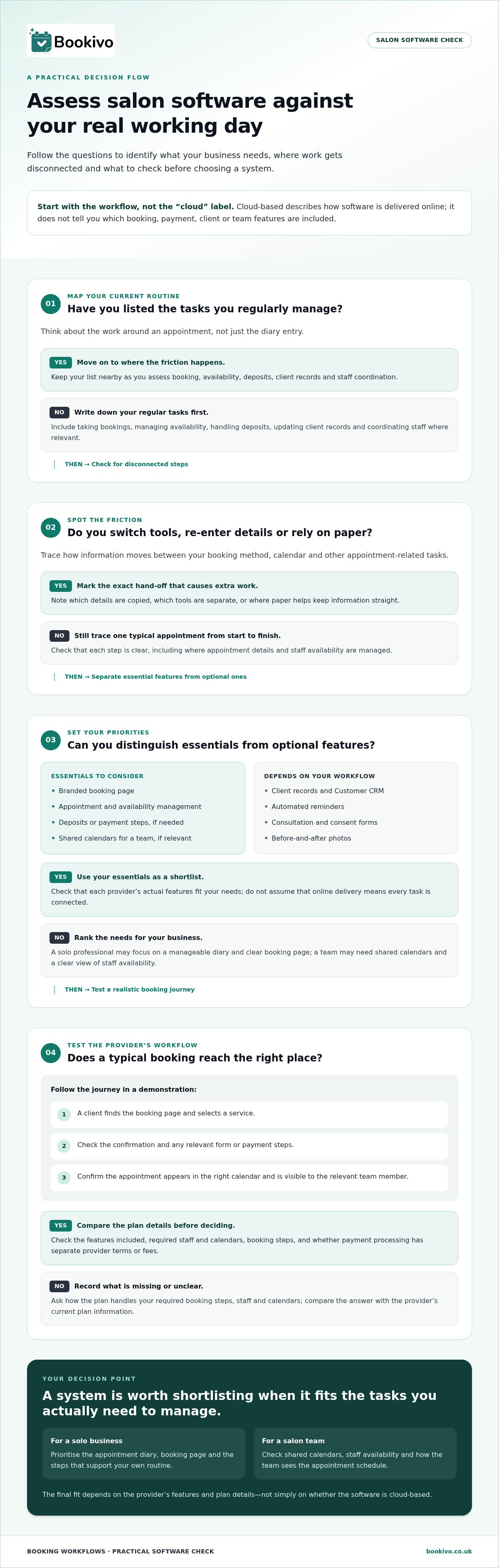
How can you assess cloud-based salon software before choosing?
Use your real working day as the test. A clear shortlist helps you separate useful tools from features that sound appealing but won’t solve a current problem.
- List your regular tasks. Include taking bookings, managing availability, handling deposits, updating client records and coordinating staff.
- Identify the friction. Note where you re-enter details, switch between tools or rely on paper to keep information straight.
- Prioritise what matters. Decide which needs are essential, such as branded booking or team calendars, and which are optional.
- Test a realistic journey. Follow a client booking a service, receiving confirmation and appearing in the right calendar. Include any forms or payment steps relevant to your business.
Questions to use in a software demonstration
Ask to see the client booking journey and the business calendar using a typical appointment. Check how the plan handles your required staff, calendars and booking steps. Review which features are included and whether payment processing has separate provider terms or fees. If you need a unified setup to handle card transactions in-person or online, visit Strictly. Compare those details with the provider’s current plan information, rather than relying on an old quote or feature summary.
Plan a manageable move from existing booking methods
Before switching, write down your services, working hours, availability and essential client processes. Choose a quieter period for setup, then explain any booking changes clearly to clients. Keep privacy questions separate from feature comparisons: software can support record-keeping, but it doesn’t by itself establish compliance. For UK data protection guidance, refer to the Information Commissioner’s Office (ICO).
Use this checklist to compare cloud based salon software uk against your actual workflow, not just its feature list. A branded booking preview can also help you assess how your business will appear to clients.
How Bookivo supports a more connected salon booking setup
Once you’ve mapped your requirements, compare them with the work a platform supports. Bookivo is a UK booking and business-management platform for salons, aesthetics clinics, barbers and independent professionals. Its branded booking website gives clients a destination that reflects your business identity, rather than relying on a marketplace listing.
A branded booking website with business-management tools
Bookivo brings online bookings, deposits and Stripe payments together with tools for managing client and team workflows. These include automated appointment reminders, consultation and consent forms, Customer CRM, before-and-after photos, team calendars and availability management. Consider which of these match your day-to-day needs, and how you’d use them alongside your existing processes.
A branded website can keep your business identity central to the booking journey. A solo professional may focus on bookings and records, whilst a team may also need shared calendar and availability tools. Compare the setup with your own priorities, rather than choosing by feature count alone.
See whether the setup fits your business
Bookivo offers a free branded preview, so you can see how a booking website could look for your business before deciding whether it matches your needs. You can also explore the platform with a 7-day free trial, with no credit card required. Use the opportunity to consider whether the available tools suit your typical working day.
See how the booking page could represent your business and support the workflow you’ve outlined.
Take the next step at a pace that suits your business
Choosing cloud based salon software uk is a business decision, not a technical test. Focus on whether the setup supports the way you want clients to book and the way you need to organise your working day. A system that fits your priorities is more useful than a long list of tools you may never use.
Before making a change, keep your requirements close and picture an ordinary working day. Consider what clients will experience, what you’ll need to manage, and which parts of the process you want to bring together. This gives you a practical basis for deciding whether a new setup feels right, without rushing into a change simply because the software is available.
Bookivo’s free branded preview gives you a way to see how a booking website could represent your business. Take a look, compare it with your needs and decide what feels like a sensible next move.
See what Bookivo could look like for your business.
A more organised booking process starts with a clear view of what matters to you. Choose the setup that helps you run your business with confidence.
Frequently Asked Questions
What is cloud-based salon software?
It’s an online service for running selected salon tasks, with the exact tools depending on the platform and plan. Before choosing, check what happens to your information if you change plans or stop using the service, and whether the provider explains how you can access or manage your records. These practical details matter just as much as the booking functions offered by cloud based salon software uk.
Is cloud-based salon software suitable for a solo beauty professional?
It may be a good fit if the tools reflect how you work, rather than the size of your business alone. For instance, a mobile therapist with changing working hours may value a different setup from a professional who works from one treatment room. Write down the tasks you handle each week, then compare them with the plan so you’re not choosing features you won’t use.
Can cloud-based salon software help manage a team calendar?
It can, depending on the platform’s calendar functions. During a demonstration, use a realistic staffing example: one team member changes their working hours whilst another has appointments already arranged. Check whether the calendar view makes the information you need easy to interpret, and clarify who on your team will keep schedules current. This helps you assess whether the tool suits your coordination habits.
How should a salon assess privacy when choosing cloud software?
Start by deciding which client details you genuinely need for bookings and ongoing business records. Before moving information into a new system, review what you hold, who uses it and what should be transferred. Read the provider’s privacy information to understand its stated approach to data. These steps can inform your assessment, but using software alone doesn’t guarantee compliance with data-protection requirements.