Software for self-employed beauticians in the UK: pricing
Compare software for self-employed beauticians in the UK: check VAT, booking, payment and client-record costs to find a plan without paying for extras.
A software price is only comparable once you know whether VAT is included. There’s no single figure that suits every self-employed beautician, so compare the subscription cost with the tools you’ll use. Software for self-employed beauticians in the UK can bring bookings, client records and payments together, but the right fit depends on how you run your business.
It’s easy to focus on the monthly cost and overlook what’s included. Check how the system handles online bookings, deposits and payment processing, and whether client notes and consultation forms are straightforward to manage. These details affect how useful the software is in your day-to-day work.
This guide explains how to compare costs transparently, including VAT, and what to look for in booking, payment and client-record tools. You’ll also learn how to weigh usability and support against the features you need, so you can choose a practical setup without paying for functions that don’t suit your business.
Key Takeaways
- Compare what each subscription includes and how its pricing is presented, rather than judging software by the headline cost alone.
- Choose booking and payment tools that fit how you take appointments and deposits, including the payment methods your clients prefer.
- Keep client notes and digital consultation forms organised, and consider how you’ll manage business records separately from booking software.
- Review how reminders and deposits fit your appointment process, then look for a system that brings the useful tools together without adding unnecessary complexity.
Comparing salon software by usability, cost and support
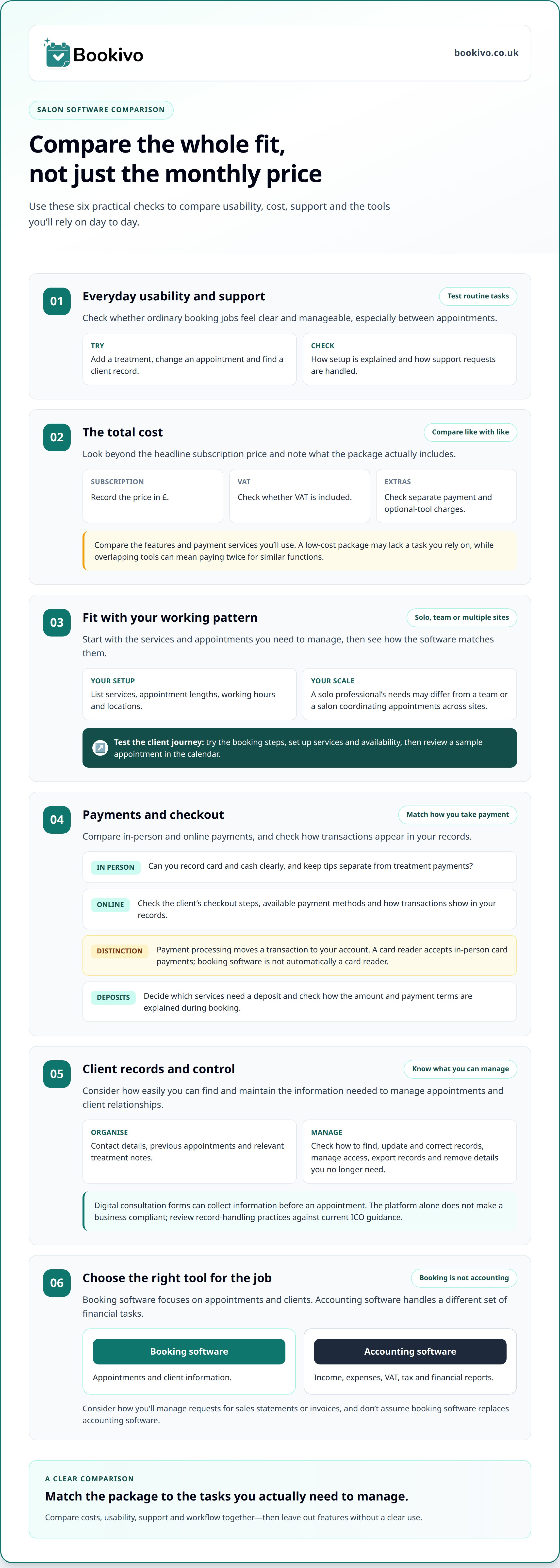
For a UK freelance beautician, suitable booking and salon management software should fit your services and daily workflow. Compare ease of use, total cost, support, payment tracking and whether you need to manage one location or several.
Assessing usability and support
Test everyday tasks, such as adding a treatment, changing an appointment and finding a client record. A clear calendar can simplify daily operations, especially when you manage bookings between appointments. Check how setup is explained and how support requests are handled. If you work in a team, see whether staff can follow the same booking process and access relevant calendar information. A multi-location salon also needs a practical way to coordinate appointments across sites.
Comparing software costs
Compare the whole package, not just its headline subscription price. Note the price in £, whether VAT is included and any separate charges for payments or optional tools. The total depends on the features and payment services you use, so compare like with like. Consider how your workflow handles requests for sales statements or invoices. Booking software focuses on appointments and clients; accounting software handles income, expenses, VAT, tax and financial reports. Don’t assume one replaces the other. A common mistake is paying for overlapping tools or choosing a low-cost package that lacks a task you rely on.
Choosing and setting up booking software
Start by listing the services, appointment lengths, working hours and locations you need to manage. Then compare those requirements against each package and test the booking steps from a client’s perspective. Set up your services and availability before sharing the booking page, then review a sample appointment in the calendar. Avoid importing unnecessary records or selecting features without a clear use. A booking setup for solo beauticians should suit an independent professional’s workflow; larger salons may need team and location management instead.
Contactless and other payment methods
For an independent UK beauty therapist, payment software should suit your checkout, online bookings and mobile work. The right option depends on how you take payments and whether you need a separate card reader.
Card, cash and tip tracking
Consider whether your payment setup can clearly record card and cash transactions, making it easier to reconcile takings after appointments. For example, record a cash payment against the correct service instead of leaving it in a separate note. If you accept tips, decide how to record them separately from treatment payments. Consistent entries make payment tracking easier to review.
Payment processing and checkout
Payment processing describes how a transaction moves from a client’s payment method to your account. A card reader accepts in-person card payments; booking software may manage appointments and online payments, but it isn’t automatically a card reader. Compare the checkout process on a mobile device and consider how each payment appears in your records. If you work with another therapist, commission splitting may matter. Establish how each person’s share will be calculated and recorded before choosing a system. Don’t assume every package supports automatic splits.
Online payments and deposits
Online payments let clients pay through a booking journey, whilst deposits collect part of the appointment cost in advance. Decide which services need a deposit and how you’ll explain the amount and payment terms during booking. For mobile appointments, a payment link or online checkout can be useful when clients book remotely. Compare the steps clients must complete, the payment methods available and how transactions are shown in your records. See how a branded booking experience could look as part of that comparison.
Client records and digital consultation forms
Salon software can bring client details, appointment history and digital consultation forms into one workflow. Compare how records are organised, controlled and used to manage client relationships.
Managing client records
A useful client record can bring together contact details, previous appointments and relevant treatment notes. Before a repeat booking, for instance, you can review the service history instead of searching through separate messages. Digital consultation forms can collect information before an appointment, while reminders help clients keep track of bookings. Check how easily you can find, update and correct records. Keep marketing activity separate from information needed to manage appointments.
Client data ownership and control
Before choosing a platform, find out how you can access client records and what happens if you stop using the service. Look for clear information about exporting records, managing user access and removing details you no longer need. These practical controls matter if you change salon software or work with another professional. Keep a separate, secure record of how clients found your business, such as through a referral or direct booking.
Storing health and treatment records
UK rules for storing beauty client health and treatment records depend on what information you collect and how you use it. Treat health-related details as sensitive, restrict access and collect only information relevant to your service. The Information Commissioner’s Office (ICO) provides authoritative UK data protection guidance. Digital forms can help organise responses, but the platform alone doesn’t make a business compliant. Review your record-handling and retention practices against current guidance.
Marketplace discovery can introduce new clients, but check how any new-client fees are calculated before relying on that channel. Compare it with direct online booking, where clients book through your own business presence. For marketing, loyalty schemes and referrals, record the source of a booking and client preferences separately from treatment notes. Use reminders for appointments, not as a substitute for deciding how promotional messages are managed.
Appointment reminders, deposits and card capture
Appointment scheduling sets the practical terms for each hair and beauty service. Compare how reminders, deposits and card capture fit your booking process rather than treating them as interchangeable tools.
Start with the calendar. Add each service, its duration and the time needed between appointments. A colour appointment, for example, may need a different slot from a quick tidy-up. Check how the system handles changes, cancellations and overlapping bookings. Clear availability helps clients choose suitable times, while accurate scheduling gives you a reliable view of your working day.
Appointment reminders help clients keep track of upcoming bookings. Check which channels the software uses, what details clients receive and whether you can manage reminder settings. Keep service messages separate from marketing: a reminder about tomorrow’s appointment is different from a promotion for a new service. For guidance on electronic marketing messages, consult the Information Commissioner’s Office (ICO) guidance.
Deposits can be collected during online booking to secure an appointment. Decide which services need a deposit, how you’ll explain the amount and how you’ll handle changes or cancellations. Card capture may involve collecting or saving payment details for a future transaction. Compare what the feature actually does, when a payment can be taken and how the client is informed. Don’t assume every booking system includes card capture or handles deposits in the same way.
Finally, consider reporting. A useful appointment record should make it easier to see whether a booking has a deposit, a reminder or an outstanding balance. If you’re a salon member working across shared calendars, agree how appointment changes are recorded. Review a typical booking from selection through confirmation, then check how it appears in your schedule. This practical test can reveal extra steps before you commit.
For a self-employed beauty therapist, a suitable booking system should match your appointment workflow and clearly show deposits, reminders and outstanding balances. Check exactly how it handles card capture, when payments can be taken and how clients are informed. Don’t assume every system includes these features or handles deposits in the same way.
Bookivo
Bookivo helps independent beauty professionals manage bookings and business tasks online. If you’re comparing software for self-employed beauticians in the UK, consider whether its booking tools and branded website suit your services and routine. Bookivo provides online appointment booking for beauty and salon businesses, including aesthetics clinics.
The platform lets businesses manage appointments, take deposits and process online payments through a branded booking website. It may suit you if you want booking and payment tools in one place.
See what Bookivo could look like for your business. Start your free trial.
Choose software that fits your next stage
Your choice should support how you want to run your business, not dictate it. Before deciding, picture a typical working week and consider how your services, appointments and client experience may change. Software for self-employed beauticians in the UK should fit your current routine while leaving room to adjust your setup as your business develops.
Bookivo offers Beauty & Salon Booking Software, Aesthetics Clinic Booking Software and an Online Appointment Booking System. These options are a starting point for comparing how bookings and business management could work together for your type of beauty business. Choose the arrangement that suits your current needs, then take the next step at a pace that feels right.
A considered choice can make daily organisation clearer and help you focus on the work you enjoy.
Frequently Asked Questions
Are the prices shown with VAT?
Don’t assume a displayed software price includes VAT unless the pricing information says so. Look for a clear VAT note alongside the plan price, then compare providers on the same basis. When reviewing Bookivo’s monthly plans, refer to its current pricing information. This helps you budget accurately rather than comparing figures that may treat VAT differently.
Can I track product costs and chair rent as expenses?
No. Bookivo supports booking and business management, but it isn’t accounting software or an expense ledger. Record costs such as product purchases and chair rent separately in your accounting records, and keep relevant receipts or invoices with clear descriptions. This helps distinguish appointment and payment activity from business overheads when you review your finances.
Can it manage stock, marketing and business reporting?
Don’t assume Bookivo offers stock control, marketing automation or reporting. Tasks such as recording a delivery of cleanser or checking remaining lash trays need a separate tool or manual process. Marketing also differs from appointment management: plan promotions and referral tracking separately, and check Bookivo’s current feature information for details of its reporting.
Do UK salons need GDPR-compliant software?
UK salons must handle personal data in line with applicable data protection law; software alone can’t make a business compliant. Consider how the platform handles client information, and set clear rules for access and record retention. For current UK guidance on personal data, including sensitive details, consult the Information Commissioner’s Office (ICO).
Does it include online booking and reminders?
Bookivo supports online appointment bookings. Check its current feature information to confirm whether reminders are available. Clients can book through a branded booking website. Keep promotional messages distinct from booking updates, and make sure reminder wording and timing suit how you communicate with clients.
How is client and business data protected?
Data protection depends on a provider’s safeguards and how you manage records. Review the provider’s privacy and security information, including how access, storage and data export work. Use individual logins where available, limit access to people who need it and avoid sharing client details through unsecured messages. The ICO provides guidance on handling personal information.