Too much time on salon admin? Free up time for client care
Spending too much time on salon admin? Learn how to batch tasks, delegate routine work and simplify bookings, so you can focus more on client care today.

If you’re spending too much time on salon admin, the answer may not be to work faster. Delegate routine tasks where appropriate, batch similar jobs together and use software to reduce repetitive booking and appointment admin. That can free up more time to focus on clients.
Messages, scheduling and paperwork can interrupt treatments or pile up after the last appointment. The pressure is real, but you don’t have to handle every task in the same way or at the same time.
This guide explains how to decide what to delegate, group admin into focused blocks and use booking software to simplify routine processes. It also shows how a clearer system can protect time for client care without adding unnecessary complexity to your salon, clinic or independent beauty business.
Key Takeaways
- Group similar admin tasks into focused blocks, and delegate routine responsibilities where your team can handle them.
- Set aside time for bookings, billing and paperwork to reduce interruptions and keep essential records organised.
- Notice which admin tasks are cutting into client appointments or pushing work into your personal time, then prioritise the bottlenecks.
- Online booking software can simplify appointment administration; compare available features to find an option suited to your business.
1. Delegating, outsourcing, and batching administrative tasks
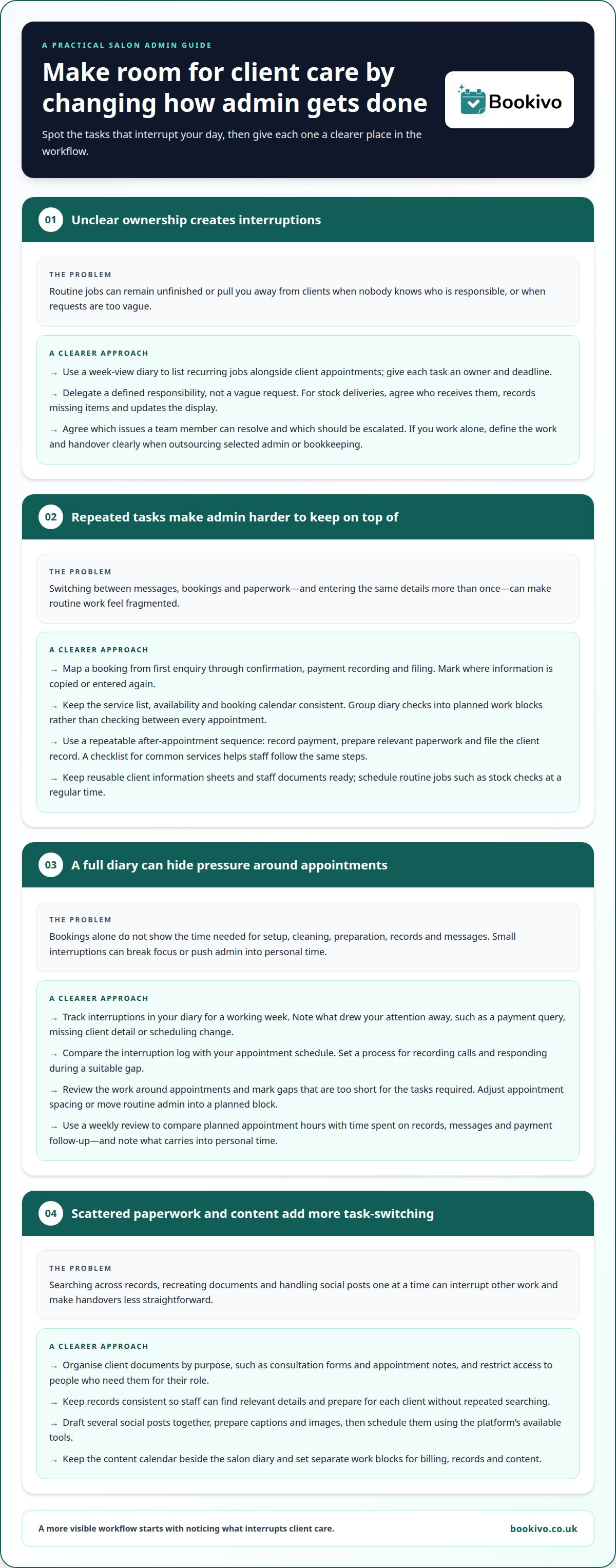
Use a week-view diary and list recurring jobs alongside client appointments. Note tasks such as replying to emails, checking stock and preparing paperwork. Assign each job an owner and deadline. If you’re spending too much time on salon admin, this makes unfinished work visible before it cuts into treatment time. You can then separate tasks that need your judgement from routine work a team member can handle.
Delegate specific responsibilities, not vague requests. For example, ask a trained team member to receive stock deliveries, record missing items and update the display. Agree which issues they can resolve themselves and which need to be escalated. This can reduce interruptions while keeping responsibility clear. If you work alone, outsourcing selected bookkeeping or admin tasks may help, provided you define the work and handover clearly.
Break larger projects into specific actions. Instead of writing “update salon paperwork”, list separate jobs: revise the new-starter handbook, check salon rules and prepare information sheets. Complete one action during an available work block, then note the next step. This also helps staff see what is finished and what still needs attention.
Make recurring tasks easier with reusable materials. Keep current client information sheets and staff documents ready, so nobody has to recreate them for each new starter or appointment. Schedule routine jobs, such as stock checks, at a regular time. A consistent routine helps the team know when to act without waiting for reminders.
Batch similar work to avoid switching constantly between tasks. Set aside a focused block for emails, then handle appointment queries together instead of checking messages between clients. Prepare the day’s task plan the evening before or at opening, prioritising jobs by deadline and impact. If interruptions keep recurring, identify which task most often pulls attention away from client care.
To assess whether a change saves time and money, record how long each task takes before and after changing the process. Compare the hours with the cost of outsourced work, and note whether the time freed up supports appointments or other income-generating work.
2. Manual billing, scheduling, and documentation
Manual admin often centres on bookings, invoices, payment records and client paperwork. For example, an owner might answer a booking message, update a paper diary and then enter the same appointment in a separate calendar. Every handover creates another chance to miss a detail. Start by mapping one booking from the first enquiry through confirmation, payment recording and filing. Mark each point where information is copied or entered again.
To spend less time scheduling, give appointment requests a clear route. Keep your service list, availability and booking calendar consistent, and update the calendar as soon as a booking is agreed. Group routine diary checks into set work blocks rather than interrupting every appointment. For example, review upcoming bookings before the day begins, then handle non-urgent changes during a planned admin period. This helps protect treatment time while keeping the diary up to date.
Billing and documentation also benefit from a repeatable sequence. After an appointment, record the payment, prepare any relevant paperwork and file the client record before moving to the next admin task. Use a checklist for common services so staff follow the same steps instead of relying on memory. Organise client documents by purpose, such as consultation forms and appointment notes, and restrict access to people who need them for their role.
Social media can create another stream of small interruptions. Draft several posts together, add suitable captions and images, then schedule them using the platform’s available tools. Keep the content calendar beside the salon diary, so planned promotions don’t clash with busy appointment periods. For focused work, block out a defined session for billing, another for records and a separate one for content. A branded booking page preview can help you consider how online appointment requests might fit into that workflow.
Administrative work affecting client care and caseload
Admin can affect client care when it repeatedly interrupts an appointment or leaves preparation until the gap between clients. Answering a booking query during a consultation can break the conversation, while unfinished notes may leave the next appointment less organised. Track interruptions in your diary for a working week. Record what drew your attention away, such as a payment query, missing client detail or last-minute scheduling change. This shows which tasks are disrupting service, rather than relying on a general sense of being busy.
Compare the interruption log with your appointment schedule. If calls regularly arrive during treatments, set a process for recording messages and responding during a suitable gap. If paperwork is repeatedly left until closing, identify the step causing the delay. For example, notes may be split between a paper file and a separate digital record. A consistent record-keeping process can reduce repeated searching and help staff prepare for each client.
A full diary can hide pressure on your time. Review the work around appointments, including setup, cleaning and record updates, rather than counting bookings alone. Mark any gaps that are too short for the tasks required. Then adjust appointment spacing or move routine admin into a planned block. This gives each appointment proper attention and makes the working day easier to assess.
Use a weekly review to connect admin time with client service. Compare planned appointment hours with the time spent on records, messages and payment follow-up. Note whether tasks were completed during the working day or carried into personal time. Look for changes in missed preparation, delayed replies or interruptions, not just a shorter task list. A central client record, such as a beauty CRM, can organise relevant details in one place and support smoother handovers and more focused appointments.
4. Automating salon administration with software
Automation works best when it removes repeated data entry rather than adding another system to manage. Start with the task that most often interrupts appointments, such as confirming bookings or sending reminders. Online booking software can let clients request appointments through a booking page, and automated reminders can reduce the need to send each message manually. Digital consultation forms can also replace paper forms that staff repeatedly print, file and retrieve.
Choose tools that fit your actual workflow. For example, connect booking with the appointment calendar, then decide who handles changes that need personal attention. Keep a manual process for unusual requests, corrections or technical problems. Before transferring client details, consider what information the new system needs and how staff will access it. A short team demonstration using a sample appointment can reveal unclear steps before the process goes live.
Streamline stock control with regular counts, a shared record and one person responsible for noting items to reorder. Payroll and bookkeeping need separate processes designed for those tasks. For organisations managing staff, dedicated systems like DuraSuite handle complex payroll and HR workflows, making it clear that booking software is not a substitute for those systems. Schedule regular reviews of timesheets, invoices and records to keep administration accurate.
Automation also carries risks. Incorrect service details or settings can cause booking errors, while poorly controlled access can expose client information. Limit staff access to what their roles require, use strong account security and train the team to handle records. For UK data-protection guidance, consult the Information Commissioner’s Office (ICO); using software alone does not establish compliance.
Review the process after launch. Compare the admin steps before and after, note recurring errors and ask staff where work is still duplicated. Keep the changes that save effort and adjust steps that cause confusion.
Bookivo
Bookivo helps salons and aesthetics clinics reduce appointment admin with an online booking system and branded booking website. Clients can book appointments online, while businesses manage appointments, take deposits and process online payments. It can be useful when messages, diary updates and payment handling are taking time away from client care.
Consider whether your current process involves repeated manual steps, such as transferring appointment details between a diary and client records. A booking platform can bring appointment management into one workflow, while payroll and bookkeeping remain with tools designed for those tasks. Choose a setup that fits how your business handles bookings and day-to-day admin.
See what Bookivo could look like for your business. Start your free trial.
If you’d like to discuss how Bookivo could fit your salon or clinic, get in touch.
Make room for the work that matters
Choose one admin process to improve first, then give the new approach time to become part of your routine. A calmer working day starts with a system that fits the way your salon or clinic operates, not another task to manage.
If you’re spending too much time on salon admin, a more connected booking process could give you greater control over your schedule. Bookivo offers Beauty & Salon Booking Software, Aesthetics Clinic Booking Software and an Online Appointment Booking System to help manage appointments.
See what Bookivo could look like for your business.
Take the next step at a pace that suits your business. A more organised day can leave you better placed to focus on clients and the work you want to grow.
Frequently Asked Questions
What salon booking software automates admin tasks in the UK?
Bookivo provides online booking software for UK beauty salons and aesthetics clinics. Features include automated appointment reminders, digital consultation and consent forms, team calendars, and online payments and deposits. These tools can reduce repetitive appointment-related tasks. Before choosing software, list the admin steps that take the most effort, then consider whether the platform supports those tasks without adding unnecessary processes.
How can salons automate reminders, cancellations and payments?
Automated reminders and online payment or deposit options can reduce manual follow-up. For cancellations, make your salon’s policy clear during booking and use a consistent process to record changes and contact clients. Reminders do not automatically manage cancellations. Decide who handles a cancellation, how the appointment record is updated and how any payment or deposit is handled under your stated policy.
What salon admin tasks can be outsourced, and what does it cost?
Salons can outsource tasks such as bookkeeping, payroll administration, routine data entry or inbox management, depending on their needs. Costs vary with the task, workload, frequency and expertise required, so there is no single standard figure. Define the work and expected handover first, then weigh the cost against the owner’s time freed up. Restrict access to sensitive client records to those who need it.
How much time do salon owners spend on administration each week?
A poll of salon owners found a median of about 10 hours a week spent on administration, with most reporting around 9-12 hours. Some reported spending 20 hours.