Automated Salon Client Reminders: A Practical UK Guide
Learn how automated salon client reminders improve communication and reduce manual work. A practical UK guide for salons, clinics, and solo professionals.
What if better appointment communication depended less on sending more reminders and more on making each one clear and considerate? Automated salon client reminders can keep booked appointments visible without adding another round of manual messages to your working day.
If you’re fitting client calls and texts around treatments, bookings and business tasks, it’s easy to see why automation appeals. But reminders aren’t a cure-all: they can support an organised process, not guarantee that every client attends. The message, its timing and how it fits with the rest of your booking communication all matter.
This guide explains what automated reminders can and can’t do, and how to plan a professional process that keeps clients informed without overwhelming them. You’ll also find practical points to consider when choosing booking software, including how reminders fit alongside online appointments, client records, team calendars and availability. The aim is a clearer, more manageable process for your salon, clinic, barbershop or solo beauty business.
Key Takeaways
- Automated salon client reminders can reduce manual follow-up, but they’re one part of appointment communication, not a guarantee that clients will attend.
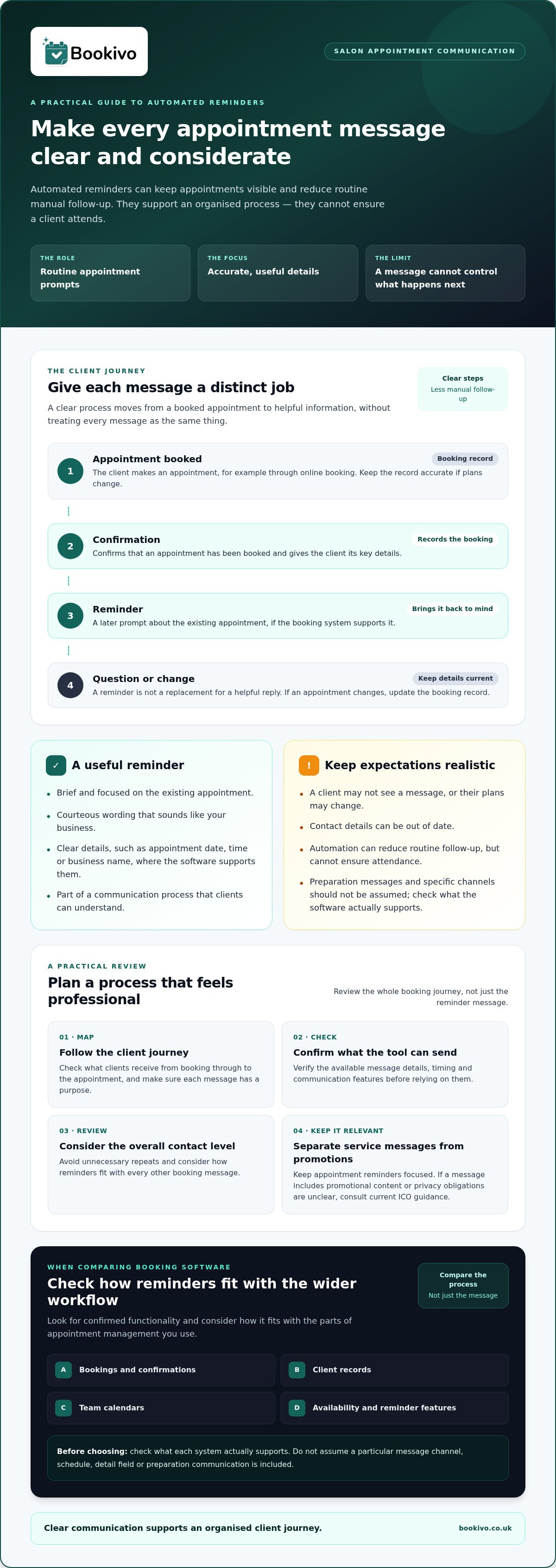
- Map the booking journey from appointment booking to confirmation, and check that clients receive clear details about what they’ve booked.
- Plan reminder communication around your clients’ needs, then review whether the process is working for your salon or beauty business.
- When comparing booking software, check how confirmed reminder functionality fits alongside bookings, client records, team calendars and availability.
What are automated salon client reminders, and what can they realistically do?
Automated salon client reminders are appointment messages triggered by booking software, rather than messages sent manually after someone checks the diary. What the software sends and when depends on its features, so check the details before choosing a system.
With a paper diary or separate calendar, you need to spot upcoming appointments and follow up yourself. Software with automated reminders can handle this routine communication, helping you keep appointment information in front of clients without adding each message to your task list. It can support a well-organised client journey, but it doesn’t replace attentive service or your judgement about what clients need to know. This forms part of managing client interactions and information, sometimes called Customer Relationship Management (CRM).
Which appointment communication tasks can automation support?
A booking confirmation and a reminder have different jobs. The confirmation records that an appointment has been booked and gives the client the key details. A reminder is a later prompt about that existing booking. Separate appointment-preparation communications may also be useful, but don’t assume a reminder system sends these. Check what each tool actually supports.
Think of reminders as one part of the communication process, not a substitute for a helpful reply when a client has a question or needs to discuss a booking. If a client contacts you to change an appointment, the booking record still needs to be updated so your information remains accurate.
Do automated reminders prevent every missed appointment?
No. A message can prompt a client, but it can’t ensure they see it, remember the appointment or attend. Contact details may be out of date, or plans may change after a reminder has been sent. Set expectations accordingly: automation can reduce routine manual follow-up and help keep appointments visible, but it can’t control what happens next.
Use reminders as practical support for a clear booking process, not as a promise of attendance. Keep appointment details straightforward, and make sure clients know how to contact you if they need to ask about their booking.
How do automated appointment reminders fit into a salon booking journey?
A clear booking journey gives each message a purpose. A client books online, receives a confirmation with the appointment information, then may receive a reminder closer to the appointment if the booking system supports it. Keep these steps distinct: a confirmation records the booking, while a reminder brings it back to the client’s attention.
Clear details help clients recognise what they’ve booked and spot a mistake early. Check what your system includes in confirmations and reminders, and don’t assume it can show particular fields or send messages through a specific channel. Cambridge Judge Business School discusses the significant financial impact of no-shows in NHS settings. That research isn’t salon data, but it illustrates why organised appointment communication matters.
What should a useful appointment reminder communicate?
Keep the message brief and focused on helping the client identify their existing appointment. Where the software supports it, relevant details might include the appointment date, time or business name. Check which details are available in the message before relying on them. A reminder shouldn’t introduce unrelated offers or leave the client unsure about what they booked.
How can reminders feel professional rather than intrusive?
Use straightforward, courteous wording that sounds like your business. Avoid unnecessary repeats, and review how often clients are contacted across the whole booking journey. The right approach depends on your clients and communication preferences. If a reminder includes promotional content, or you’re unsure about privacy obligations, consult current guidance from the UK Information Commissioner’s Office rather than assuming every message is treated the same way.
For a deeper explanation of reminder planning, see Reduce No-Shows with Automated Beauty Reminders. If you’re considering how online booking and appointment communication could work together, view a branded booking preview.
How can beauty professionals plan a practical reminder process?
Start with the appointments you manage, then decide what clients need to hear and check that your process stays accurate. A short review can prevent reminders from becoming just another message with no clear purpose.
- Map the booking journey. Note how appointments are made, confirmed, changed or cancelled, and where a reminder could help.
- Identify communication needs. Decide which booking details clients may need to refer to. Keep reminders separate from preparation information and promotional messages.
- Review the process. Check appointment records and client feedback. If messages are unclear or unnecessary, adjust your approach.
Keep reminders distinct from cancellation terms and deposits. These are separate parts of your business’s booking arrangements. Communicate those terms clearly instead of relying on a reminder to explain them. Accurate appointment information matters too: check that booking details and availability are up to date before relying on automated salon client reminders.
What should you check before choosing reminder software?
Confirm that automated appointment reminders are included, then ask the provider what the feature does and which details or settings it supports. Check whether bookings, client records, calendars and reminders fit your existing workflow. For example, consider how you’ll update a booking when a client changes their appointment, and whether your calendar and availability information can be managed in the same system. For more on organising client information, see Salon Client Management: UK Professional Guide 2026.
How can a solo professional or team review the process?
If you work alone, keep appointments and availability current as your working day changes. In a team, agree who updates booking information and who checks calendar accuracy. Clear ownership helps prevent outdated details from carrying through to client communications. If your process involves electronic messages, consult the ICO’s guidance on the UK's Privacy and Electronic Communications Regulations. This is general guidance, not a substitute for advice on your specific circumstances.
How can salon booking software make reminders easier to manage?
Manual diary follow-up gives you direct control, but you need to check appointments and contact clients yourself. Booking software with automated reminders can bring appointment information and reminder tasks together. The exact functions vary, so check what the provider includes before choosing.
| Task | Manual diary follow-up | Booking software with reminders |
|---|---|---|
| Bookings | Review and update appointments by hand. | Manage bookings in the system, and check how changes are reflected in reminders. |
| Client records | Look up details in your chosen records. | Check whether client records sit alongside booking information. |
| Team calendars and availability | Keep calendars and availability current manually. | Check whether team calendars and availability are included and suit your workflow. |
| Reminders | Remember to follow up with each client. | Use the system’s confirmed reminder functionality, and verify its scope with the provider. |
Bookivo brings online salon bookings together with automated reminders and customer CRM. Its appointment-management features also include team calendars and availability management. For context on taking bookings through your website, see How to Add Online Booking to Your Existing Beauty Salon Website. When comparing systems, consider whether automated salon client reminders fit alongside the tools and routines you already use, and confirm the reminder details that matter to your business.
Explore your options
Review the Bookivo pricing page for current plan information. You can also explore a branded preview or try the platform before deciding whether it suits your business.
Build a clearer appointment communication process
Automated salon client reminders work best as part of a considered booking journey. Keep appointment information accurate, make each message clear and relevant, and treat reminders as support rather than a promise that every client will attend. Keep reminder messages separate from booking confirmations, preparation information and cancellation terms.
Choosing software is about more than reminders alone. Consider how bookings, client records, calendars and availability fit together in your day-to-day work. Bookivo includes automated reminders alongside online bookings and customer CRM, bringing key appointment tasks into one platform.
You can explore a free branded preview before signing up and see whether the booking experience suits your salon, clinic or beauty business. A few thoughtful checks can make appointment communication easier to manage: start with the process that works for your business, then refine it as you learn what your clients need.
Frequently Asked Questions
What are automated salon client reminders?
Automated salon client reminders are appointment communications triggered by booking software, rather than sent manually after checking a diary. They can help keep booked appointments visible and reduce routine follow-up work, depending on the system’s features. They’re one part of a wider booking journey, alongside the initial confirmation and any separate information clients need about their appointment.
Can automated appointment reminders stop clients from missing appointments?
No. A reminder can prompt a client, but it can’t make sure they read it, remember the appointment or attend. Treat automated reminders as practical support for clear appointment communication, not a guarantee. Accurate booking details and a process for handling changes still matter, as clients’ plans can change after a reminder has been sent.
What should a salon appointment reminder include?
A useful reminder should help the client identify the appointment they’ve booked. Depending on what the software supports, this may include details such as the appointment date, time or salon name. Check which information the system can include rather than assuming particular message fields are available. Keep the wording concise, professional and focused on the booking, without unrelated promotional content.
Are automated salon reminders suitable for solo beauty professionals?
Yes. A solo beauty professional may find automated reminders useful for reducing the need to contact each client manually whilst balancing appointments and other business tasks. Before choosing a system, check how reminders fit with online bookings, client records and availability management. Keep appointment information accurate, especially if you manage diary changes yourself.
Does Bookivo include automated appointment reminders?
Yes. Automated appointment reminders are a Bookivo feature. Bookivo also includes online bookings and customer CRM, bringing these appointment and client-management tools together in one platform. Check the current product information for details about how reminders work, as specific delivery channels, timing and settings shouldn’t be assumed. You can explore a free branded preview before signing up.
Request your free branded preview to see how Bookivo’s booking website and automated reminders could fit your business, or explore the Bookivo platform and its free 7-day trial.