How to Stop Mixing Up Client Appointments
Learn how to stop mixing up client appointments with a clear booking process, one reliable diary and simple daily checks for your salon or beauty business.

To stop mixing up client appointments, make your diary the single source of truth and follow the same booking process every time. Treat each change as part of the booking, not as a separate message to remember later. This gives you a clearer view of the day and helps prevent small oversights from affecting the client experience.
In a busy salon, clinic or mobile beauty business, scheduling may involve clients, colleagues, rooms and different services. Your system needs to work during treatments as well as quieter admin periods. Trace where confusion enters your process, then choose routines that suit the way your business runs. These practical steps can bring more order to your schedule without adding unnecessary admin.
Key Takeaways
- Set one clear process for recording new bookings, including the client, service and appointment time.
- Make schedule changes in the calendar straight away, rather than relying on messages or memory.
- Build a brief diary review into your opening and closing routines to catch gaps or clashes.
- Consider an online booking system when managing appointments across separate tools becomes difficult.
How to stop mixing up client appointments
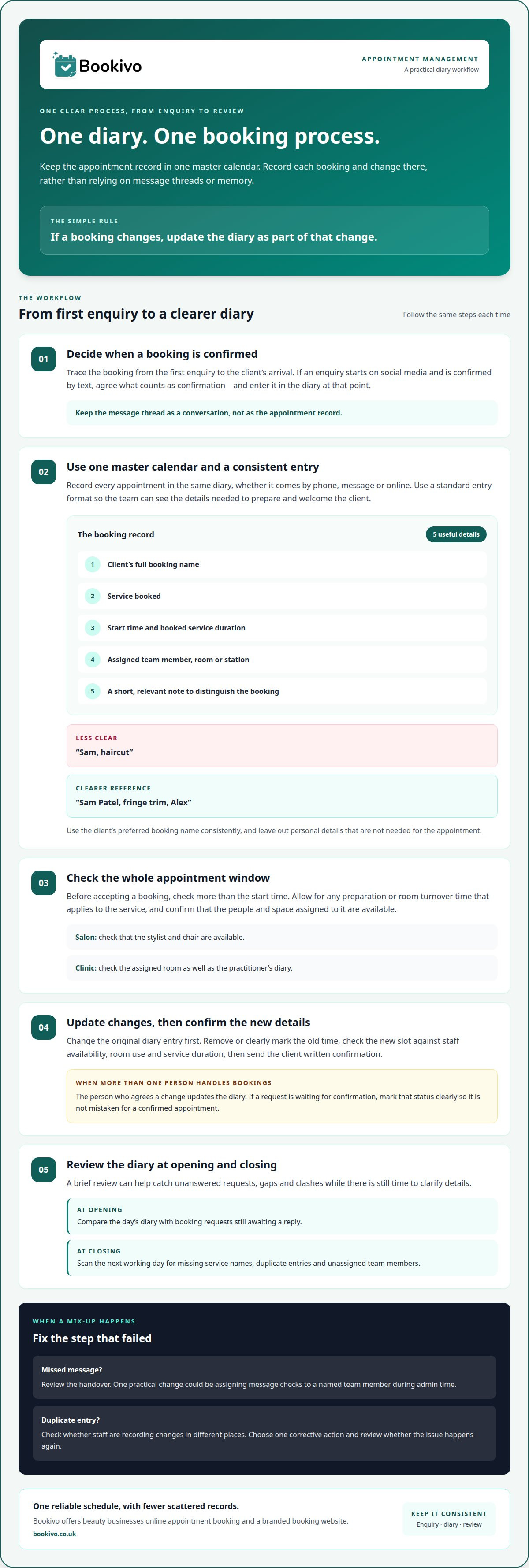
Trace a booking from the first enquiry to the client’s arrival. A client might ask about a brow appointment on social media, then confirm by text. Decide what makes the booking confirmed, and enter it in the diary at that point. Don’t rely on the message thread as the appointment record.
Keep one master calendar, even if enquiries come through several channels. With a paper diary, enter every phone booking before ending the call. With a digital calendar, update the record while the details are fresh. Don’t split appointments between a personal calendar and the salon diary: competing records make clashes harder to spot.
Use a standard entry format so each appointment includes the details you need to prepare and welcome the client. Include:
- The client’s full booking name, especially when names are similar.
- The service, such as a fringe trim or gel manicure.
- The start time and the booked service duration.
- The team member, room or station assigned to the appointment.
- A short, relevant note that distinguishes the booking.
For example, “Sam, haircut” doesn’t show which team member is working or which service the client expects. “Sam Patel, fringe trim, Alex” gives the team a clearer reference. Use the client’s preferred booking name consistently, and leave out personal details that aren’t needed for the appointment.
When a booking changes, update the original entry first. If Priya moves her lash appointment from a morning slot to an afternoon one, remove or clearly mark the old time. Check the new slot against staff availability, room use and service duration, then send Priya written confirmation so you both have the revised details to refer to.
Set a handover process when more than one person handles bookings. Whoever agrees a change should update the diary, rather than relying on a verbal message to a colleague. If a receptionist records a request while a therapist is treating a client, mark it as awaiting confirmation. Define that status clearly so nobody mistakes a request for a confirmed appointment.
Check the full appointment window before accepting a booking. A service may need preparation or room turnover time, even if the calendar shows only the client-facing slot. In a salon, check that the stylist and chair are available. In a clinic, check the assigned room as well as the practitioner’s diary. This can reveal overlaps that checking start times alone misses.
Build a short review into your opening and closing routines. At opening, compare the day’s diary with booking requests still awaiting a reply. At closing, scan the next working day for missing service names, duplicate entries and unassigned team members. Resolve unclear details while the person who made the booking is available.
Record what caused each mix-up, then fix the process that failed. A missed social media message may point to an unclear handover; a duplicate entry may mean staff are recording changes in different places. Choose one corrective action, such as assigning message checks to a named team member during admin time, then review whether the issue happens again.
Bookivo: Beauty & Salon Booking Software
Bookivo gives beauty businesses an online appointment booking system and branded booking website to manage appointments. It can help when bookings arrive through several channels and maintaining one reliable schedule takes too much manual effort. Clients can book through your business’s online presence, while you manage appointments in one central platform instead of relying on scattered messages and diary entries.
For salons and independent professionals, this provides a clearer route from a client’s booking to the working diary. Much like fitness and training facilities rely on dedicated management tools such as VO2WOD to coordinate sessions, aesthetics clinics and salons also benefit from software designed for their sector. Consider whether a single online booking route would simplify the way your business accepts appointments and organises its schedule.
Explore Bookivo at bookivo.co.uk.
Make your next booking easier to manage
If you’re deciding how to stop mixing up client appointments, identify where your current process becomes difficult to follow. A complete overhaul may not be necessary: a clearer handover, a more suitable booking tool or a small change to how your team records updates may be enough. Choose one improvement that addresses the source of confusion, then assess it during a normal working week.
Revisit your process as your services, team or booking habits change. A system that suited a solo business may need adjusting when more people manage the diary. Keep it practical: staff should understand it quickly and use it consistently, even during busy periods. Bookivo’s branded booking website can help you explore whether online booking suits the way you want to manage appointments.
A clear, consistent process helps you welcome clients and run your business with confidence.