Salon software without commission fees: compare free and paid options
Compare salon software without commission fees, from free plans to paid options. Check booking charges, deposits, reminders and staff calendars to choose.

Yes, free salon booking software is available in the UK, and salon software without commission fees can help you avoid percentage-based booking charges. However, a free plan may still involve payment processing, messaging or other costs, so check exactly what the terms include.
Managing bookings alongside deposits, reminders and staff calendars can be a lot to juggle. The right option depends on the tools your business needs and how the charges work.
This guide compares free and paid options, explains subscription and per-booking pricing, and outlines what to check in deposits, reminders and team calendars. Use these points to decide whether a free plan will do the job or a paid system better suits your booking routine.
Key Takeaways
- Compare free plans by checking which booking tools they include and what changes when you need more features.
- Look beyond the headline price: understand how subscriptions and per-appointment charges affect costs as bookings grow.
- Assess how deposits, reminders and staff calendars could fit your appointment process and help keep the day organised.
- Use the comparison to decide whether a straightforward booking system or a broader salon management platform better suits your business.
Is there any free salon booking software available in the UK?
Yes, free salon booking software is available in the UK, but whether it suits your salon depends on the plan’s terms. Compare the included tools with any booking, messaging or payment charges.
Booking and Staff Management Tools
Compare whether booking software brings reporting, payment records and staff scheduling together. A solo stylist may need a straightforward appointment diary, while a salon with several team members may need calendars that show each person’s availability. Good reporting should make bookings and payments easy to review without combining separate records.
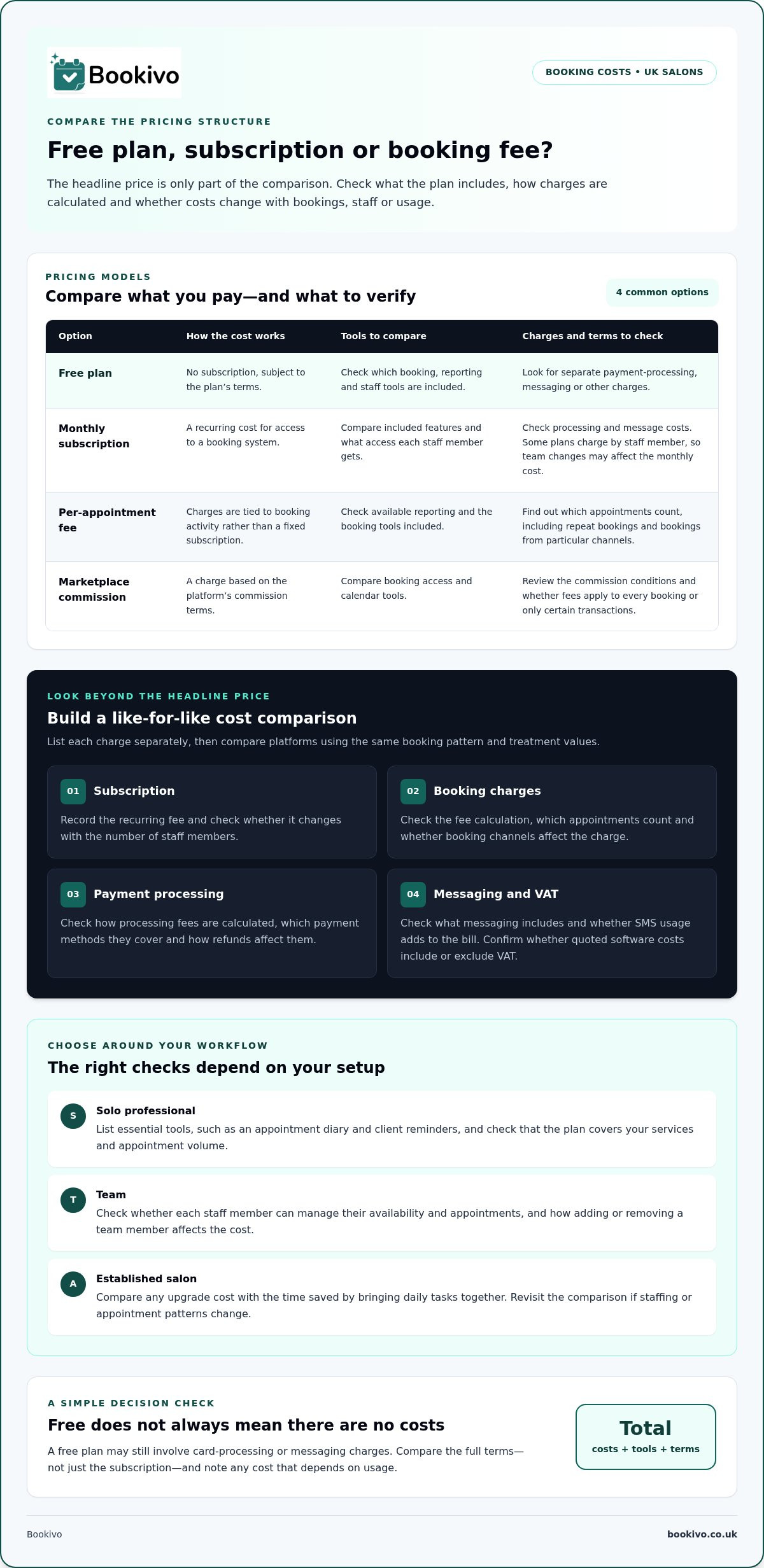
Use this table to compare common options by pricing structure and day-to-day tools:
| Option | Cost structure | Reporting and scheduling | Payments and messages |
|---|---|---|---|
| Free plan | No subscription, subject to plan terms | Check included tools | Check for separate charges |
| Monthly subscription | Recurring cost | Compare included features | Check processing and message costs |
| Per-booking fee | Charge for each appointment | Check available reporting | Review booking and payment terms |
| Marketplace commission | Charge based on the platform’s commission terms | Compare booking access and calendar tools | Review commission conditions |
Payment and Message Charges
A free booking plan may still involve card processing fees, so separate the software cost from payment costs. Check how processing fees are calculated, which payment methods they cover and how refunds affect them. Messaging may also cost extra; check what is included and whether SMS usage adds to the bill.
For UK data handling, the Information Commissioner’s Office guidance for organisations explains data protection responsibilities. Compare systems for secure storage, access controls and clear data management practices. Check that the software supports UK payment methods and can record deposits and completed payments.
When budgeting for VAT, check whether quoted software costs include or exclude VAT, then account for the treatment relevant to your business. Choose based on your booking volume, team calendar needs and total costs, not just the advertised subscription.
Free-plan limitations and paid upgrades
A free plan may suit a solo stylist trying online booking before replacing a paper diary. Check whether it covers the staff, services and appointment volume you need. If your team grows, a paid plan may offer useful shared calendars, reporting or reminders in one system.
Commission-free options include booking software with a monthly subscription, a free tier with separate payment charges, or direct bookings through your salon’s own website. A marketplace may help clients discover a salon, but its commission model differs from software that charges for access to booking tools. Compare how each option handles new and returning clients, and whether fees apply to every booking or only certain transactions.
- For a solo professional: list essential tools, such as an appointment diary and client reminders, before choosing a free plan.
- For a team: check whether each staff member can manage their availability and appointments.
- For an established salon: compare the cost of any upgrade against the time saved by combining daily tasks.
Before starting a free trial, check its length, what happens when it ends and whether payment details are required. Note the renewal date, then test a booking from start to finish: add a service, set availability and follow the appointment through to confirmation. This shows whether the system suits your workflow, not just its feature list.
Keep a short comparison for each platform: included features, monthly fee, booking charges, payment processing, message costs and cancellation terms. Mark any charge that depends on usage, so a low starting price doesn’t conceal a cost that rises with appointments. For a direct-booking option, you can preview a branded booking website as one way to assess how the customer booking experience could look.
Subscription pricing versus per-appointment fees
A monthly subscription and a per-appointment fee affect salon costs differently. Compare both against your booking pattern and the features you need.
Subscription Pricing
A subscription charges a recurring amount for access to a booking system. Some plans charge by staff member, so costs can rise as a team grows. Check what each person’s access includes and how the monthly cost fits your setup. A flat subscription may stay the same at different booking volumes, depending on its terms.
Per-Appointment Fees
A per-appointment model ties charges to booking activity rather than a fixed subscription. Check which appointments count, including whether repeat bookings incur charges or only bookings from particular channels.
Long-Term Costs and Pricing Transparency
For a useful long-term comparison, assess each model using the same booking pattern and treatment values. List subscription, booking commission, payment processing and messaging charges separately. Salon plans and direct booking systems may use different billing structures, so compare their stated terms and included features rather than assuming they work alike.
Transparent pricing explains how charges are calculated, when billing happens and whether usage affects the total. If a subscription is charged per stylist, consider how adding or removing a team member changes the monthly cost. Compare the terms with your booking records, and review them if staffing or appointment patterns change.
Deposits, reminders and staff calendars
Yes. UK salons can use commission-free software with deposits and booking policies for cancellations and missed appointments. Before choosing, compare how each system handles payments, client reminders and calendar access.
Deposits can encourage clients to commit to appointments, while a clear cancellation policy explains what happens if plans change. Before enabling online booking, state the deposit amount, payment timing and cancellation terms wherever clients book. No-shows still affect your diary, so consider whether the system records missed appointments for staff follow-up.
Salon no-show rates average between 15% and 30%, according to market estimates. Automated SMS reminders can reduce salon no-shows by 40% or more, according to the same market research. Treat reminders as one part of the booking process: check whether messages are included in the monthly subscription or charged separately, and choose timing that suits your appointments.
A staff calendar should make each team member’s availability and booked services easy to see. Check whether, for example, a receptionist can view the whole team’s schedule while each stylist focuses on their own appointments. A solo professional may need only one calendar; salons with several staff should check how overlapping services and schedule changes appear.
Use this practical comparison before selecting a platform:
- Deposits: identify when clients pay and how the booking record shows payment status.
- Reminders: check which channels are available and whether message charges apply.
- Calendars: compare access for each team member and visibility across the salon.
- Policies: make cancellation terms clear during online booking.
Choose software that fits your deposit process, reminder preferences and team calendar needs, rather than focusing only on the lowest monthly cost.
Bookivo: Beauty & Salon Booking Software
Bookivo provides Beauty & Salon Booking Software to bring online appointments and a professional booking experience together. Its Online Appointment Booking System lets clients book through a branded website, so salons can offer online bookings instead of managing every appointment manually.
This can suit salons weighing up a free plan against a more integrated booking setup, especially when a professional online presence matters alongside appointment management. Compare the plan’s terms and payment processing fees with the tools you need, such as online booking and a branded website. The right option depends on how you want clients to book and how you manage appointments.
Visit Bookivo’s website to explore the platform and decide whether it fits your salon.
Choose a booking setup that fits your next stage
Choosing salon software without commission fees can give you more control over how clients book. Focus on the booking experience you want to offer and the work you need the system to handle, rather than choosing solely because it is free. A good fit can make the client experience more consistent and your working day more organised.
Bookivo offers Beauty & Salon Booking Software, Aesthetics Clinic Booking Software and an Online Appointment Booking System. Explore how its branded booking experience could work for your business and whether it suits the way you manage appointments.
Take the next step at your own pace. Your booking system should support the way you work and help you offer clients a clear, convenient booking experience.
Frequently Asked Questions
Can salons switch salon software easily?
Switching can be straightforward with a plan for transferring your data and setting up the new system. List what you need to move, such as client details, service lists and appointment history, then check what your current platform allows you to export. Bookivo provides a free data transfer service for information your existing provider allows you to export. Review the imported records before directing clients to your new booking page.
Looking for a complete salon booking and management platform?
Bookivo brings online booking and salon management tools together, including a branded booking website, team calendars, consultation forms, deposits and automated reminders. It is designed for UK beauty salons and aesthetics clinics, as well as solo professionals. For example, a salon can take appointments through its own booking website while managing staff availability and client records in the platform.
What is the difference between commission and a service fee?
Commission is usually calculated as a percentage of a booking’s value, while a service fee is a set charge linked to a booking or transaction. The exact meaning depends on the platform’s terms. A commission may vary with the treatment price, for example, while a fixed service fee may apply regardless of the service value. Check what triggers each charge and which bookings it covers.
Which UK salon software platforms charge no commission or booking fees?
Bookivo charges no marketplace commission on bookings. When comparing salon software without commission fees, distinguish marketplace commission from other costs: standard card-processing fees apply to Bookivo payments. Compare commission, booking charges and payment processing separately, and consider whether clients book through your own website or a marketplace.
Do commission-free salon booking systems charge payment processing or card fees?
They may. Commission-free refers to the booking commission model, not necessarily the cost of processing card payments. Bookivo processes online payments through Stripe, and standard card-processing fees apply. Separate the software subscription from transaction processing when comparing costs. Also check which payment methods are supported and whether processing fees vary by payment type.
Which salon software offers a free plan with no commission fees in the UK?
Bookivo offers a free branded preview and a 7-day free trial, rather than a permanently free plan. The trial requires no credit card. If you’re comparing salon software without commission fees, distinguish a temporary trial from ongoing free access. Use the trial to explore the booking setup and assess whether the paid service suits your salon’s workflow.