Beauty Salon Client Intake Forms for Personalised Client Care
Use a beauty salon client intake form template to gather relevant details, tailor questions to each service and make consultations more focused and personal.

A beauty salon client intake form template should do more than collect names. Before an appointment, salons can use it to gather contact details, relevant service history and client preferences, helping staff prepare for a focused consultation. Tailor the questions to the service booked so clients aren’t asked for information that doesn’t apply.
A well-planned form gives clients time to share useful details before they arrive, rather than trying to recall everything at the salon. Their answers can make the consultation more focused and clarify what they want from the appointment.
This guide covers what to include, how to tailor questions to different services and how to adapt a free template for your business. It also explains why treatment reference photos should be separate from permission to use images for promotion. The aim is a practical form that gathers useful details without becoming unnecessarily long or complicated.
Key Takeaways
- Use an intake form to gather relevant client details and service history before the appointment, so the consultation can focus on their needs.
- Tailor questions to the booked service and give clients time to share useful information in advance.
- Keep photos for consultation separate from permission to use images in promotional content.
- Adapt a free form to your salon’s process, or use Bookivo’s digital consultation and consent forms to manage client information alongside bookings.
Why is a hair salon client intake form used?
A salon intake form gathers useful details before an appointment, giving the stylist context before the client arrives. Bringing contact details, service history and preferences together can make the consultation more focused. It also gives clients a clear place to share anything they want the salon to know beforehand.
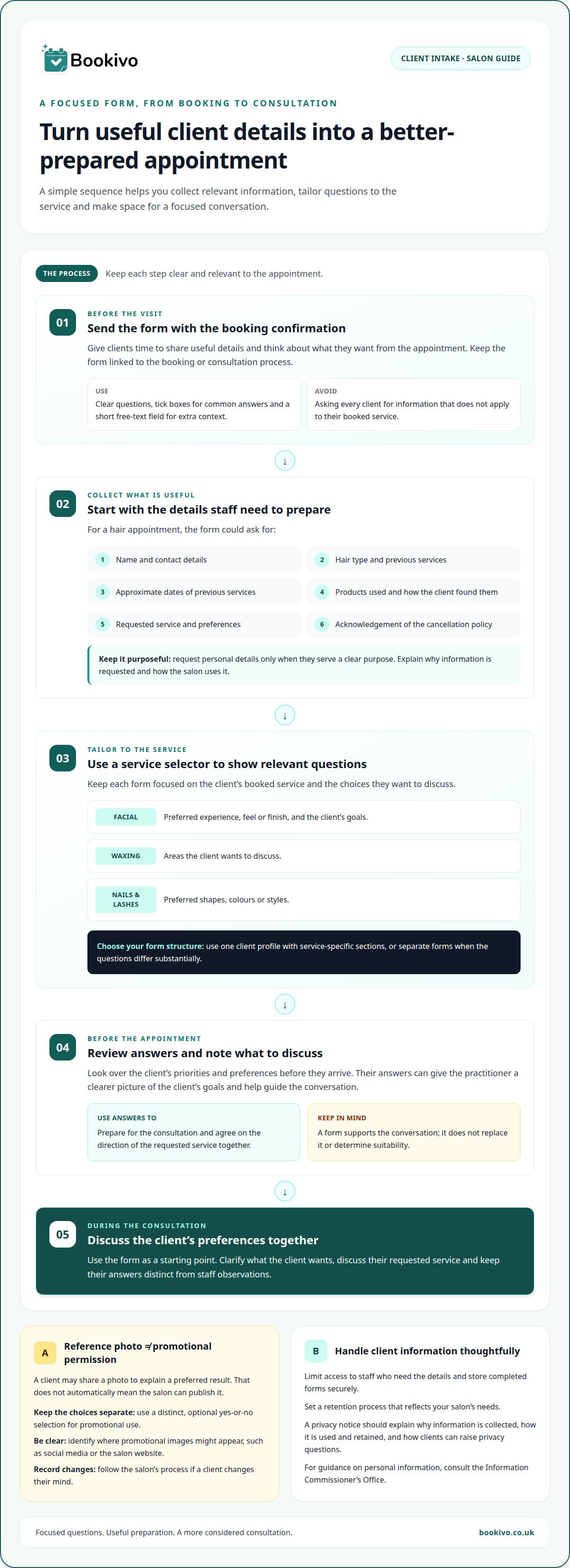
For a hair appointment, collect the client’s name, mobile number, email address, hair type, previous services and approximate dates. Ask which products they use and how they’ve found them. Studios focusing on high-end colour work, such as shampooavenue.com.au, illustrate how detailed chemical histories help colourists plan complex lightening services safely. Include the service requested and a record that the client has acknowledged the salon’s cancellation policy. Keep questions clear so staff can review the answers easily.
Request personal details only when they serve a clear purpose. A date of birth or address may help identify a client record, but don’t collect details the salon doesn’t need. If you include an optional emergency contact field, ask for the contact’s name, relationship to the client and telephone number. Explain why you’re requesting the information and how the salon uses it.
Collect information through a form linked to the booking or consultation process, rather than relying on handwritten notes. Limit access to staff who need the details, store completed forms securely and set a retention process that reflects your salon’s needs. For guidance on handling personal information, consult the Information Commissioner’s Office (ICO).
If a client reports a contraindication or another concern, record their response accurately and arrange a conversation with the practitioner responsible for the appointment. The form should capture information, not diagnose or determine suitability.
For mobile appointments, contact details can help a therapist coordinate arrival and communicate booking changes. A mobile beauty booking process can bring appointment details together with the client’s pre-visit information.
Keep the form straightforward. Use clear questions, tick boxes for common answers and a short free-text field for extra context. A focused form gathers details the salon can use without making a simple booking feel like unnecessary paperwork.
Customising forms to personalise client experiences
Tailor the consultation form to the booked service and the choices each client wants to discuss. Relevant questions help the practitioner prepare; unrelated sections can make the form harder to complete.
Preparing for Appointments
Send the form with the booking confirmation so clients have time to consider their preferences. A service selector can direct each person to questions relevant to their appointment. Before the visit, review the answers and note the client’s priorities or points to discuss. For example, someone booking a facial might describe their preferred feel or finish, while a nail client could share a shape or colour preference. Keep the form link available for updates.
Benefits of Consultation Forms
A consultation form gives the practitioner a clearer picture of the client’s goals before the appointment. Ask what they hope to achieve, which styles or services interest them and what they want the practitioner to understand about their preferences. Leading colour and precision styling salons like Ross Adams Hair & Beauty place particular emphasis on these initial insights to tailor every appointment to the individual. Use the answers to guide the conversation, not replace it.
Forms can also create a consistent process across a team. Staff can refer to the same completed sections and client preferences instead of relying on informal notes or memory. This makes it easier to discuss the requested service and agree on its direction together.
Treatment-Specific Consultation Forms
Separate forms aren’t always necessary. Use one client profile with service-specific sections, or create distinct forms when the questions differ substantially. A facial form could ask about the client’s preferred experience and goals; a waxing form could record the areas they want to discuss. Nail and lash sections might cover preferred shapes, colours or styles.
Make each form relevant to the booked service instead of giving every client one lengthy questionnaire. Keep questions focused on preferences and the consultation.
Separate photo references from promotional consent
A photo can help explain a client’s preferred result, but it doesn’t automatically give the salon permission to publish it. Keep treatment reference images separate from any request to use photographs on social media, the salon website or other promotional material. Clients should be able to share a reference without agreeing to publicity.
Make the choice clear. Use a separate, optional yes-or-no selection for promotional use and identify where images might appear. Don’t combine that choice with treatment consent or salon policies. If a client changes their mind, record the change and follow the salon’s process for handling the image.
Consultation paperwork can record relevant service history, such as a client’s previous skincare experience or products they report using. Ask only for information that helps with the booked service. Keep the client’s description separate from staff notes so a later practitioner can distinguish what the client said from staff observations.
For treatment authorisation, provide a clear space for the client to confirm the information is accurate and sign or otherwise acknowledge the form. Explain relevant salon policies, including cancellation arrangements, separately from treatment consent. A signature records the client’s confirmation; it isn’t blanket permission for unrelated uses.
A privacy notice should explain who handles client information, why it is collected, how it is used, how long it is retained and how clients can raise privacy questions. Tailor the details to your salon’s actual practices, and consult Information Commissioner’s Office guidance when preparing the notice.
Take care with liability wording. If a form includes a waiver or exclusion-of-liability clause, seek legal advice before using it. Keep consent language straightforward, and don’t present a client’s signature as proof that every possible risk has been removed.
Customising and using a free intake form template
A free template is a starting point, not a finished questionnaire. Keep fields that support the consultation, then adapt the wording and sections to your salon’s services. For a facial, ask about treatment goals and current skincare products. Remove questions that don’t help prepare for the booked service.
Review the template from the client’s perspective. Can they understand each question without staff explanation? Replace broad prompts such as “medical history” with clear, relevant questions. Give clients space to explain their answers, and make optional questions visibly optional. Avoid requesting sensitive details unless they’re relevant to the service.
Use this practical editing sequence:
- Keep the essentials: retain contact details, the booked treatment and useful service history.
- Add relevant prompts: include questions that help staff prepare, such as a facial client’s current skincare routine.
- Remove unsuitable wording: delete references to services, policies or treatments your salon doesn’t provide.
- Test the form: complete it as a client, then check that answers are easy to review before an appointment.
A template might also ask whether this is the client’s first visit, how they heard about the salon and whether someone referred them. The answers can help you understand how clients find your business. Keep promotional preferences separate from service questions so clients can respond clearly to each request.
Include a place for the client to confirm their answers and sign the completed consultation form. Review the wording and questions regularly. An annual review can help keep the paperwork aligned with current services. If your salon changes its facial menu, remove outdated prompts and add questions relevant to the new options.
For a more organised digital booking journey, See what Bookivo could look like for your business.
Bookivo: Digital Consultation & Consent Forms
Bookivo brings digital consultation and consent forms into a salon’s online booking process. It helps businesses move client paperwork from separate manual steps into a more organised digital process. Use the forms to collect consultation details and consent before appointments, while the online appointment booking system helps manage bookings.
Digital forms can be useful for salons handling several services or coordinating appointments across a team. Solo professionals may also prefer them to paper records. The right approach still depends on the questions your services require, how you explain consent and how you handle client information. Digital forms don’t replace thoughtful questions or a clear privacy notice.
To bring bookings and consultation forms into one digital process, explore Bookivo’s booking software for beauty salons and aesthetics clinics.
Make your next step a practical one
Start with one service and use the form in your next client consultation. Notice which answers help you prepare and which questions clients find unclear. Refine the wording based on that experience so the process stays useful as your services develop. A beauty salon client intake form template works best when it reflects how your business welcomes and cares for clients.
When you’re ready to connect bookings and client administration, Bookivo offers Beauty & Salon Booking Software, Aesthetics Clinic Booking Software and an Online Appointment Booking System. Choose an approach that suits your business, whether you manage a salon team or work independently.
A thoughtful, well-used form is a practical foundation for more personal client care. Take the next step at a pace that works for your salon.
Frequently Asked Questions
Do minors need a different consent process?
For a client under 18, have a parent or legal guardian review and sign the intake and consent sections. Include space for the young client’s details and the adult’s name, relationship and acknowledgement. Explain any age-related salon policy before booking, so the family can understand the process and decide whether the appointment suits the salon’s requirements.
Why Use Salon Forms?
Salon forms provide a repeatable way to record client choices, service requests and acknowledgements. They also let clients review salon information at their own pace, rather than relying on a quick verbal exchange at reception. For a small team, a consistent form gives staff the same prompts, whether they handle the booking or welcome the client.
Is there a free beauty salon client intake form template to download?
Yes, a free printable esthetician client intake form PDF is available to download. It spans two pages, has four sections and contains 23 fields. Use its layout as a starting point, not as a requirement to keep every question. Adjust the wording to suit your salon’s process and remove fields that don’t apply to your services.
What questions should a salon ask about allergies and skin conditions?
Use clear, neutral prompts that let clients share information they consider relevant, with space to explain their answers. Don’t ask a form to assess or label a condition. Limit questions to details relevant to the appointment, and explain why the salon requests them. The practitioner can discuss the client’s response within the salon’s established process.
What health and safety questions should beauty treatment intake forms include?
Keep prompts tied to the salon’s own client-safety process. For example, ask whether the client has information or concerns they want to discuss before the appointment. Avoid a generic checklist that may not fit the booked service. Staff should handle responses under the salon’s established procedures, not interpret them as a clinical assessment.
What consent and patch test wording is needed on a UK beauty salon intake form?
There’s no single wording that suits every salon or service. Explain the purpose of each consent request in plain language and make clear what the client is acknowledging. If mentioning patch testing, describe the salon’s own process without promising an outcome or suggesting the form replaces professional judgement. For a digital way to manage forms, Start your free trial.